Visual Mesh Debugger
This post goes through the development of a visual debugging tool using Python for inspecting static meshes in real-time in Unreal Engine.
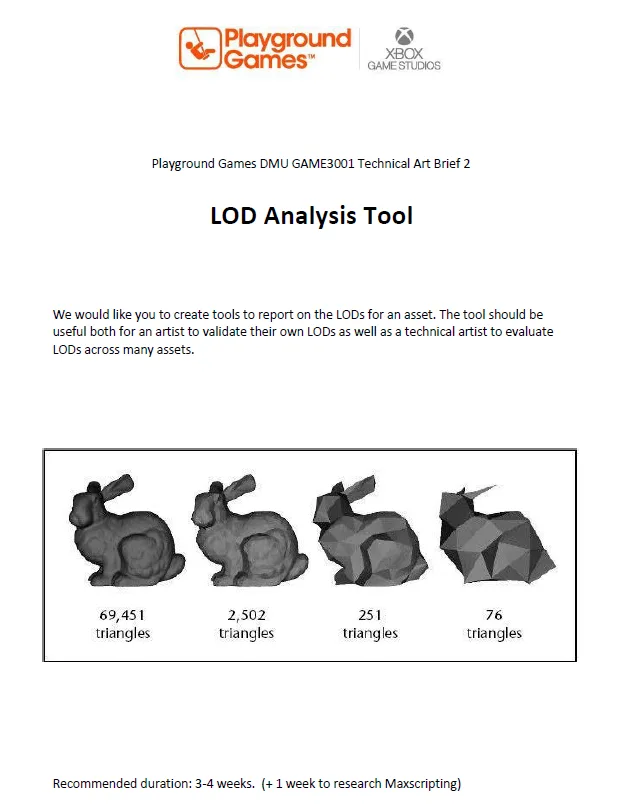
I needed to create a visual debugger to help with marking through the Unreal Editor, I wanted to keep this script simple and in Python to brush up on my skills.
Brief Essentials: I need to ensure I meet the following requirements:
report basic info to user - name, bounding box, tricount, number of materials for each lod, vertex density (number of vertices divided by bounding diameter), number of small triangles (area below 1cm), thin triangles (angle smaller than 15 degrees)
have a working user interface for running and presenting results
have a method to run across multiple assets - exporting data to csv file
document functionality of the tool in user guide
Some stretchgoals I would like to hit are:
evaluation collision
excel functionality to bring across problem assets by filtering or formatting
written entirely in python or maxscript (maybe one of each)
have a video presentation of tool and talkthrough
identify number of meshes in scene ~ estimate tricount from here
showcase savings from LODS by calculating against original tricount
Sign Off:
I am quite excited to begin this project and can’t wait to learn more about what Python has to offer with Unreal Engines blueprints! Stay tuned
Date: 09/04/2025
Planning and Setup:
To begin my project I setup Visual Studio Code with Nils Sodermans useful editor based plugin.
Flowchart of Logic:
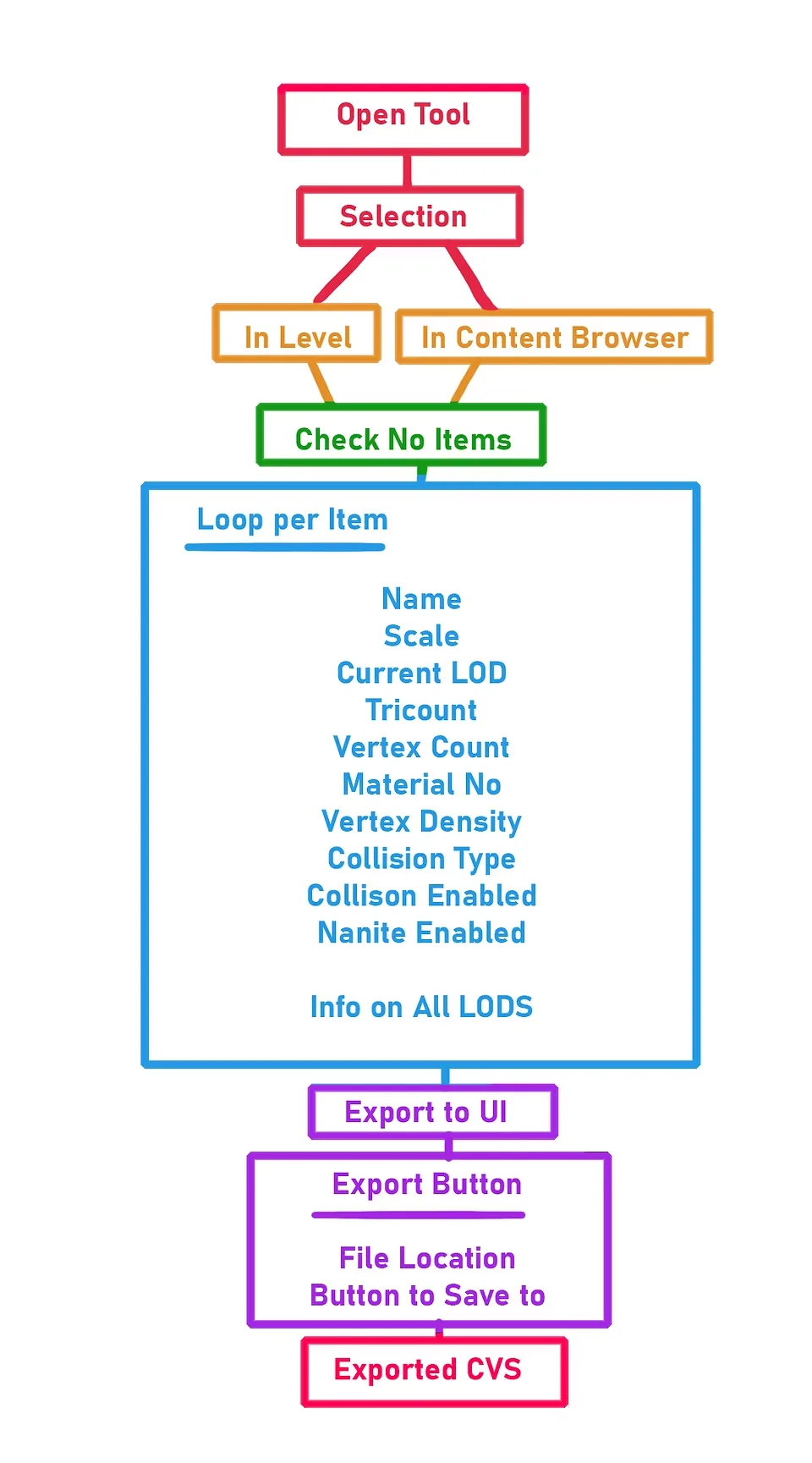
Here is a flowchart showcasing a high level overview of input and how that leads to data being gathered. I have also outlined what variables I will need to process to help meet the brief and make the tool more useful to use. I want to have one big master button that gathers this data and another to export to keep it simple. I can add more buttons to help tweak the data too for adjusting screensizes, mesh selected and more however it would still follow this graph.
Date: 11/04/2025
Problems:
Unfortunately I am quite busier with work than anticipated so I have had less time than ideal to work on the tool. However this is not my core problem as I have had issues with gathering selection with my current Python script. As seen below selection needs to dictate if meshes are being selected in level or editor. I have resolved this with a boolean called Artist Mode. I plan to have this boolean take data from a checkbox or dropdown widget element however for now I need to manually encode what it will do. Furthermore this script does not loop per asset, meaning I cannot export data out. I will need to loop this function per each select item in array to fix this. However the script gathers all my necessary variables in a very crude print line. So paste it into your Editor if you’d like to check it out!
Click to view code
import unreal
import datetime

##gets date time for my debug log printing
print(str(datetime.datetime.now()))
artistmode=True ##true is artist mode aka level selection, false is tech art mode for editor only
editor_stat_meshes=[]

getselecteditor=unreal.EditorUtilityLibrary.get_selected_assets_of_class(unreal.StaticMesh)
getselectlevel=unreal.get_editor_subsystem(unreal.EditorActorSubsystem).get_selected_level_actors()

def clean_static_meshes(listofmeshes):
    counter=0
    for x in listofmeshes:
        if isinstance(listofmeshes[counter], unreal.StaticMeshActor):
            print("its a static mesh!")
            editor_stat_meshes.append(listofmeshes[counter])
            counter=counter+1
        else:
            print("nope aint a static mesh")
            counter=counter+1

clean_static_meshes(getselectlevel)

def base_data(listofmeshes):
    ##for first mesh
    ##this fixes not getting static mesh if selection is in editor
    #if artistmode==False:
    #need a rewrite now with more try especially on artist check
    try:
        thecomponent=listofmeshes[0].static_mesh_component
        getstaticmesh=thecomponent.static_mesh

    except AttributeError:
        getstaticmesh=listofmeshes[0]

    nameofmesh=getstaticmesh.get_name()
    print(str(nameofmesh))

    #scale of box
    #also rounds values so they are not scary big decimals
    scaleofmesh=getstaticmesh.get_bounding_box()
    dimensionsx=round(scaleofmesh.max.x-scaleofmesh.min.x,1)
    dimensionsy=round(scaleofmesh.max.y-scaleofmesh.min.y,1)
    dimensionsz=round(scaleofmesh.max.z-scaleofmesh.min.z,1)

    print("this box has a width of "+str(dimensionsx)+" and height of "+str(dimensionsy)+" and a depth of "+str(dimensionsz))

    ##get total amount of lod number and current
    numberoflods=getstaticmesh.get_num_lods()
    print("this mesh has "+str(numberoflods) +" lods")

    ##this runs through each lod and its tricount and vertice count bit annoying
    lodcounter=0
    geteditor=unreal.get_editor_subsystem(unreal.StaticMeshEditorSubsystem)
    while lodcounter!=numberoflods:
        print("lod "+str(lodcounter)+" has "+str(getstaticmesh.get_num_triangles(lodcounter))+" tris")
        vertexcount=geteditor.get_number_verts(getstaticmesh,lodcounter)
        print("yeas")
        print(str(vertexcount))
        #### also get what lod distance is per one

        lodcounter=lodcounter+1

    ##finding out screensize and putting it into people words
    getscreensizes=unreal.EditorStaticMeshLibrary.get_lod_screen_sizes(getstaticmesh)
    nicerscreenlist=[]
    listcounter=0
    while listcounter!= len(getscreensizes):
        percentofscreen=round(getscreensizes[listcounter]*50,2)
        nicerscreenlist.append(percentofscreen)
        print("lod "+str(listcounter)+" pops in at "+str(percentofscreen)+"% screensize!")
        listcounter=listcounter+1
    print(str(nicerscreenlist))

    ###material nos
    numberofmats=geteditor.get_number_materials(getstaticmesh)
    print("this mesh has "+str(numberofmats)+" material(s)!")

    ##more info on materials such as what is each mat
    matlodnumber=[]
    matcounter=0
    while matcounter!=numberofmats:
        materialselected=getstaticmesh.get_material(matcounter)
        if materialselected:
            gettingmat=getstaticmesh.get_material(matcounter).get_name()
            print("this is the mat "+str(gettingmat))

        else:
            print("empty mat!")
        matcounter=matcounter+1

    ##vertex reduction
    vertexredcounter=0
    highestvertex=geteditor.get_number_verts(getstaticmesh,0)
    while vertexredcounter!=numberoflods:
        currentvertexdensity=100-round(geteditor.get_number_verts(getstaticmesh,vertexredcounter)/geteditor.get_number_verts(getstaticmesh,0)*100,2)
        print("this lod is "+str(currentvertexdensity)+"% vertex cheaper than lod0")
        vertexredcounter=vertexredcounter+1

    ##tricount reduction lods
    tricountcounter=0
    while tricountcounter!=numberoflods:
        currenttricountdensity=100-round(getstaticmesh.get_num_triangles(tricountcounter)/getstaticmesh.get_num_triangles(0)*100,2)
        print(str(getstaticmesh.get_num_triangles(tricountcounter)))
        print("this lod is "+str(currenttricountdensity)+"% tricount cheaper than lod0")
        tricountcounter=tricountcounter+1
        print("booyah")

    #vertex density by diving number of vertices by bounding diameter length so x also round cos scary decimal
    #this needs to be fixed for lod bounding areas if i can do that as it only get bound of lod00
    counter=0
    while counter!=numberoflods:
        currentvertex=geteditor.get_number_verts(getstaticmesh,counter)
        lodscaleofmesh=getstaticmesh.get_bounding_box()
        lodlength=round(lodscaleofmesh.max.x-lodscaleofmesh.min.x,1)
        diameterlod=round(currentvertex/lodlength,2)
        print("this lod has a "+str(diameterlod)+" vert density per cm")
        counter=counter+1

    #tag ideas, has vertex colors under staticmesheditorsubsyrtem,

    #get complexity of collision
    collisioncomp=geteditor.get_collision_complexity(getstaticmesh)
    thenumberofflag=collisioncomp.value
    if thenumberofflag==0:
        print("its just use default")
    elif thenumberofflag==1:
        print("its uSE_SIMPLE_AND_COMPLEX")
    elif thenumberofflag==2:
        print("its USE_SIMPLE_AS_COMPLEX")
    elif thenumberofflag==3:
        print("its USE_COMPLEX_AS_SIMPLE")
    #unrealprim=unreal.PrimitiveComponent
    gettingcoll=getstaticmesh.get_editor_property('body_setup')
    check_if_enabled = gettingcoll.get_editor_property('collision_reponse').value
    print(str(gettingcoll.get_editor_property('collision_reponse')))
    if check_if_enabled==0:
        print("collision is enabled")
    else:
        print("collision is off")
    #print(str(checkcheckcollision_enabled))
    #test2=istherecoll.get_collision_enabled()


amountofitems=len(getselecteditor)
amountofitems2=len(editor_stat_meshes)

print(str(amountofitems))
print(str(amountofitems2))

if amountofitems>0 and artistmode==False:
    print("not empty!")
    print("i have selected "+str(amountofitems)+" items in the content browser!")
    base_data(getselecteditor)
elif amountofitems2>0 and artistmode==True:
    print("not empty!")
    print("i have selected "+str(amountofitems2)+" items in the level browser!")
    base_data(editor_stat_meshes)

else:
    print("empty no selection!")
Improvements to Apply:
As spoken about earlier the script does not loop per selected asset. This is a easy fix that I plan to go through each array item with a counter and export this data in some form. My greatest hurdle is the .csv format as I have never worked with writing to .CSV before so I do not know how I should package my data from selection to be read. I assume it will most likely be string, so I may need to make a large string or string array to collection each selection. However I will need to do more research into this before I test it out.
Furthermore a critical bug I have had is inconsistency with the collision detection. No matter what I change in the static mesh editor, meshes in any mode refuse to display correct collision enabled or disabled. The type is easily obtained but I am at a loss at what is wrong especially since the in engine collision viewmode is displaying correctly? So it must be something to do with Python. I will do my best to resolve this however in the essence of time I may leave this till the end as it is not tool breaking.
Issue shown below: Collision viewport working however the tool disregards this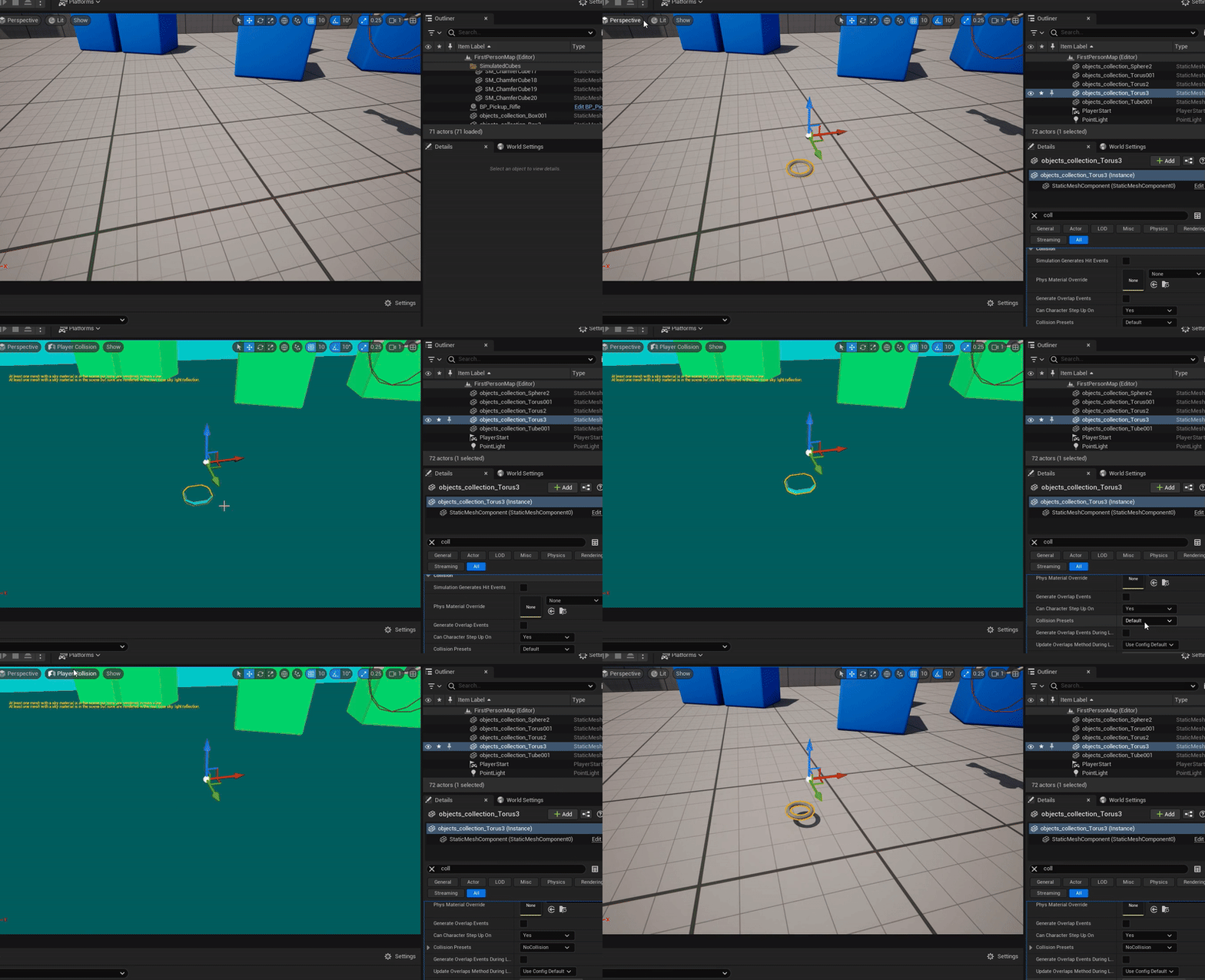
UI Designing:
Since I have figured out what data I moved onto designing a UI, for inspiration I looked to Nina Klos’s most recent tool project. What I loved most about it is how clean and easy to read the setup is alongside being docked nicely in the left corner of the viewport. The thumbnail also made it easy to tell which asset was inspected which I never knew you could do before, super awesome work. So I took a screenshot of my own viewport and began to draft a concept layout below.
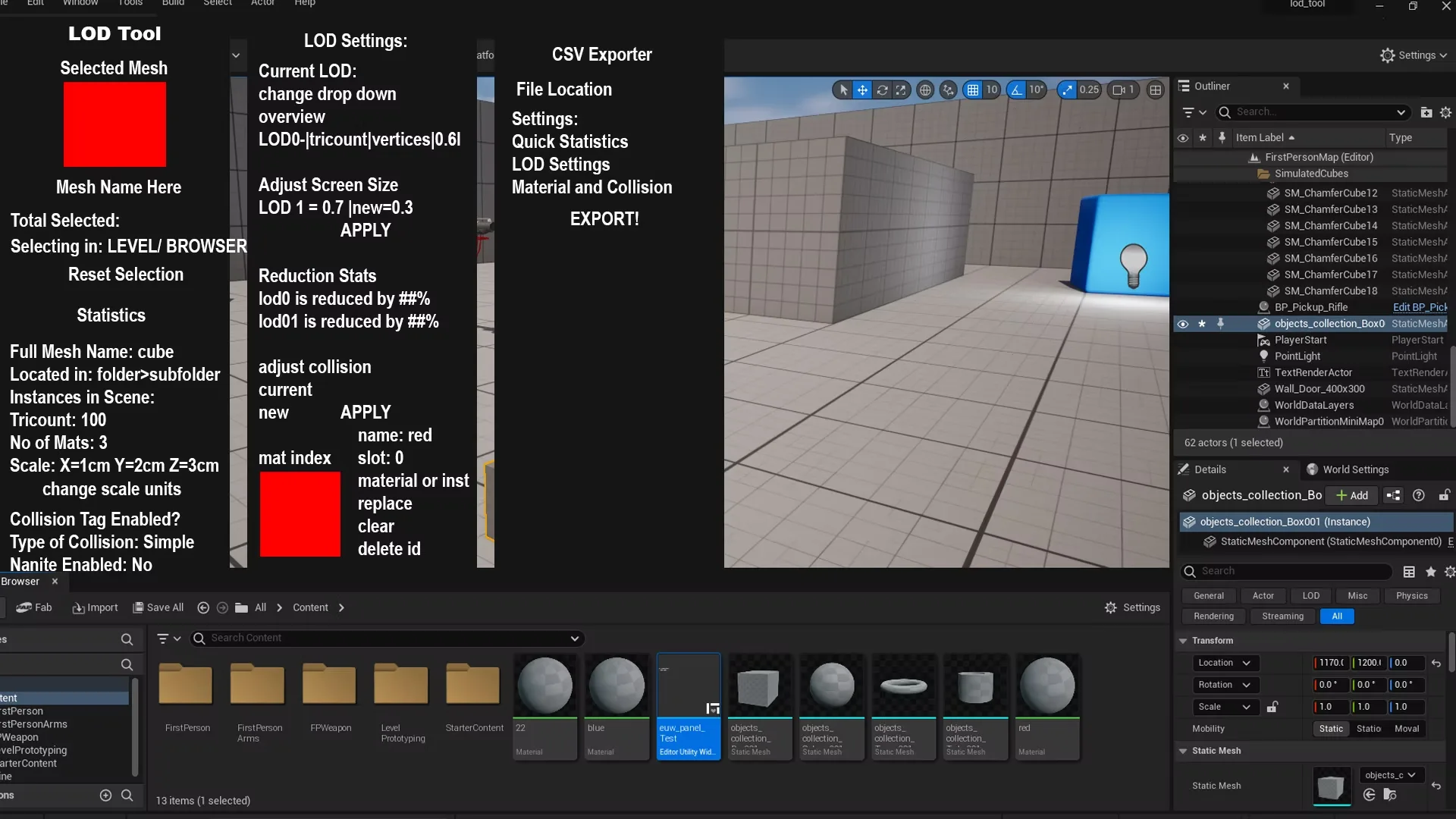
LOD Tool UI Draft 1.0
There was a lot of variables I would need to display so to makeit easier I plan to have the categories become collapsable or scrollable as I have done with widgets in the past. I ranked the parameters by what is needed most, making the name, location, tricounts, scale etc appear at the top. Then further down more LOD settings would appear ending with the CSV export button. I did not want to incite accidental export presses by grouping a ton of buttons at the top together so by leaving this button last you would really need to commit to the scroll to export out that spreadsheet! Making this menu has also made me realise theres more data I want to include such as instances in scene by counting.
You may notice a material section which I am on the fence about including as this a focused LOD tool so info on materials may make the scroll longer. I will need to test this further. I also sought some feedback from my peers and they advised that I would need better grouping and buttons included as its quite the info dump at the moment which I will get to when I implement it for real using Unreals Vertical and Horizontal boxes.
Sign Off:
Tomorrow I plan to jump onto inserting my script into a widget instead of my remote execution and put my UI design to the test. I’m excited as UI is a element I quite enjoy as it feels like sorting pieces of a puzzle together.
Bibliography:
Blueprint Utility Widget - Unreal Workflow Tool, Nina Klos 🐟 (2025) ArtStation. Available at: https://www.artstation.com/artwork/JrJGv0 (Accessed: 11 April 2025).
Date: 13/04/2025
Intro to CSV:
I do not have a lot of time today so I will be exploring csv scripting to get that deliverable met. I found a super useful post from 2023 by Damilola Oladele titled “How to Create a CSV File Using Python” (Damilola Oladele, 2024) which is exactly to the letter of what I need. It was suprisingly straightforward and it made me realise the true power of Python, you just import a library to fit whatever you need.
To test it out I rewrote the example script with the data I would need in a header and hit run in the Python terminal. It did not work and I realise that the terminal was not pointing in the correct locaton to send this csv and so I ran it again and behold!
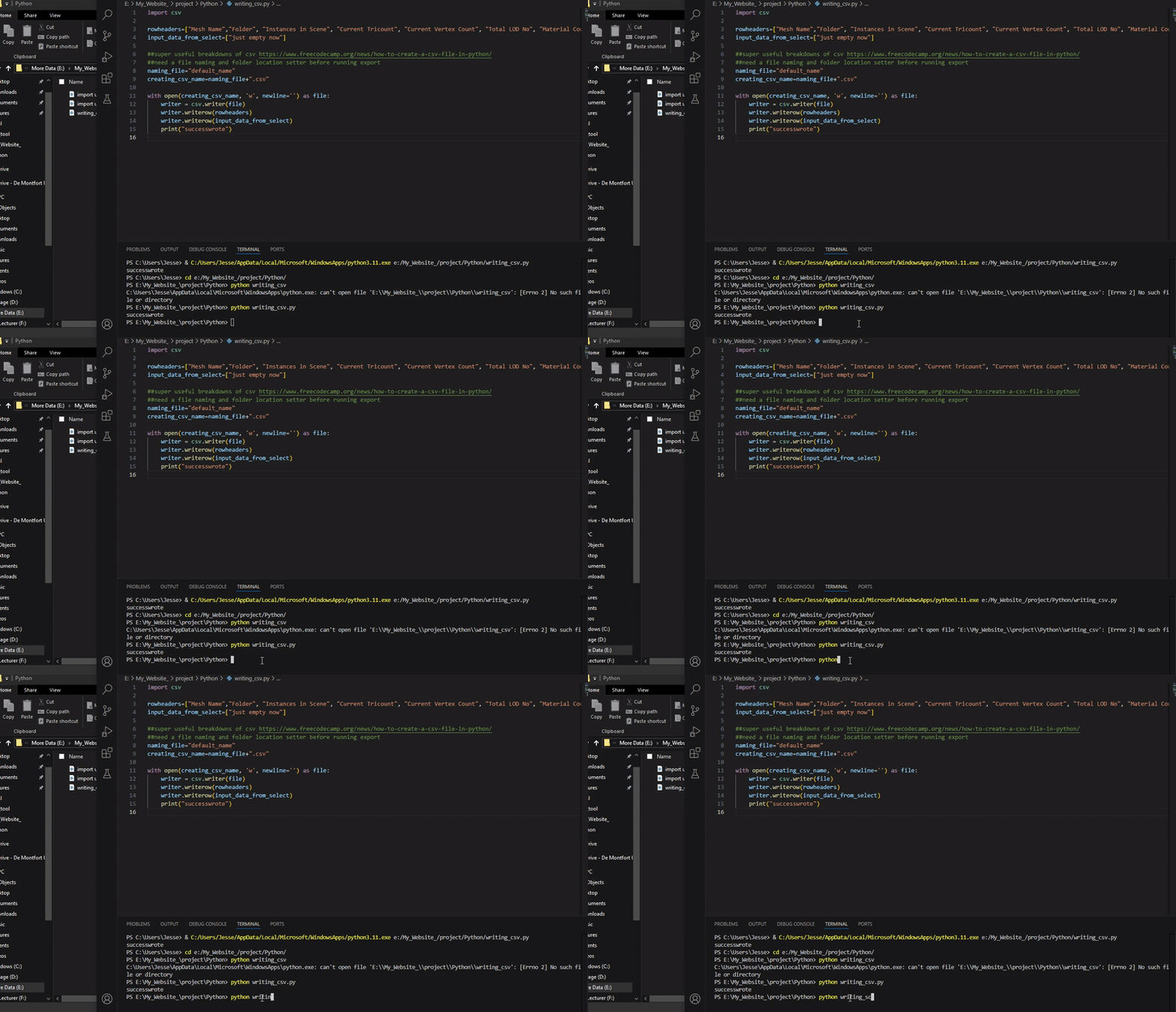
IT WORKS!! CSV EXPORTED!
As a avid lover of spreadsheets (I even have a enamel pin of Excel thank you Craig!) this literally blew my mind. So many options expanded before me and I know I want to do so much more with this type of script. However it is not complete yet, my largest issue at the moment is that the file path is my default location on C: so it has to be manually moved every run. I can however see a solution by either inputting the directory through paste when prompted or some sort of library that can look through file validation. Either way theres still some polish for this left and then further testing with actual string data that has been pushed through.
Heres the code:
import csv

rowheaders=["Mesh Name","Folder", "Instances in Scene", "Current Tricount", "Current Vertex Count", "Total LOD No", "Material Count","Units","Scale Info (X,Y,Z)","Collision Enabled", "Collision Type", "Nanite Enabled", "LOD, Tricount, Screensize","LOD Reduction %","Vertex Density per CM", "Material Names"]
input_data_from_select=["just empty now"]

##super useful breakdowns of csv https://www.freecodecamp.org/news/how-to-create-a-csv-file-in-python/
##need a file naming and folder location setter before running export
naming_file="default_name"
creating_csv_name=naming_file+".csv"

with open(creating_csv_name, 'w', newline='') as file:
    writer = csv.writer(file)
    writer.writerow(rowheaders)
    writer.writerow(input_data_from_select)
    print("successwrote")
Date: 15/04/2025
UI Development:
So I have worked hard on getting the UI up and running. Its quite responsive and has a good amount of adjustable buttons and dropdowns to help get more insight on selected assets.
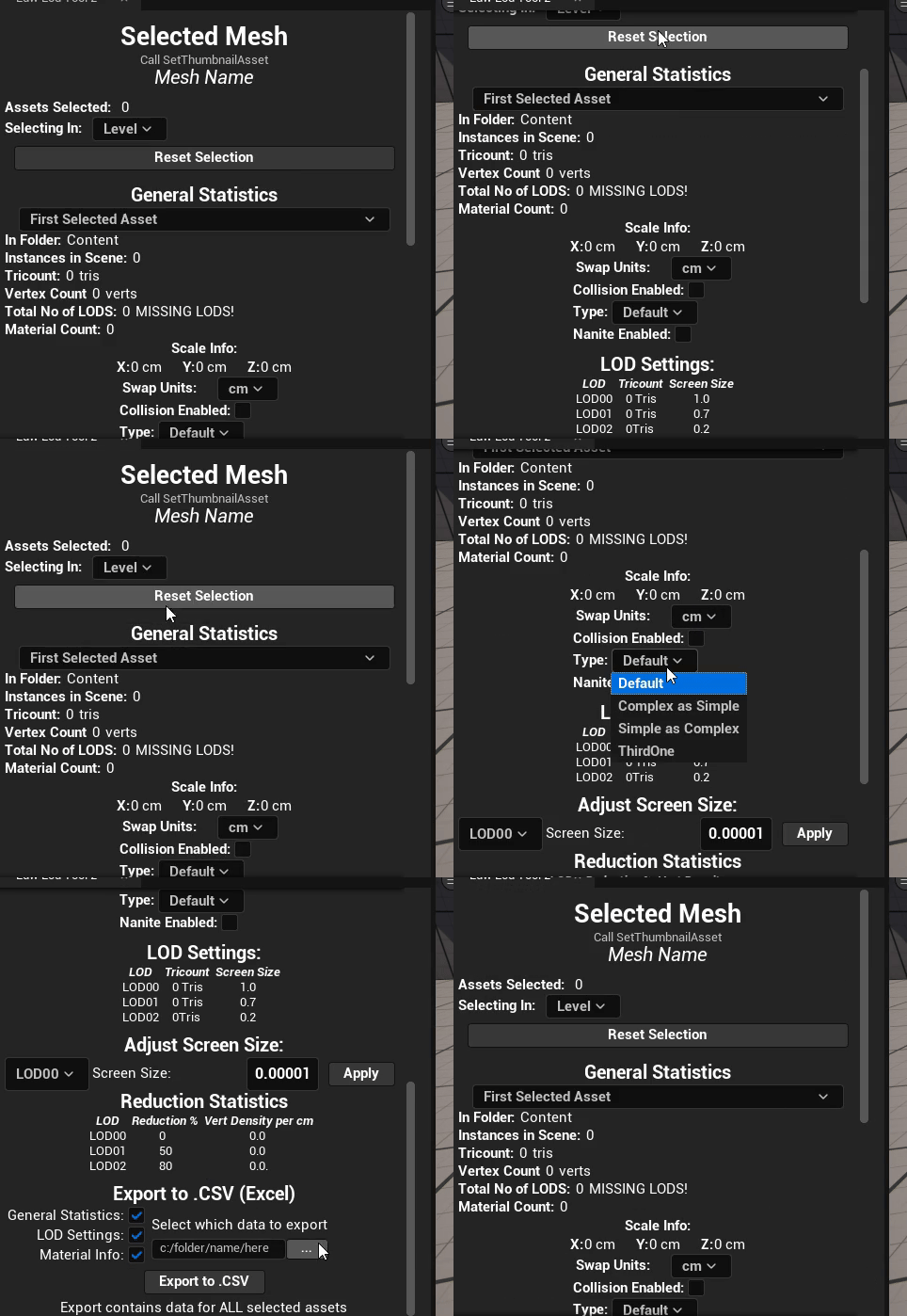
UI in Runtime
UI in Runtime
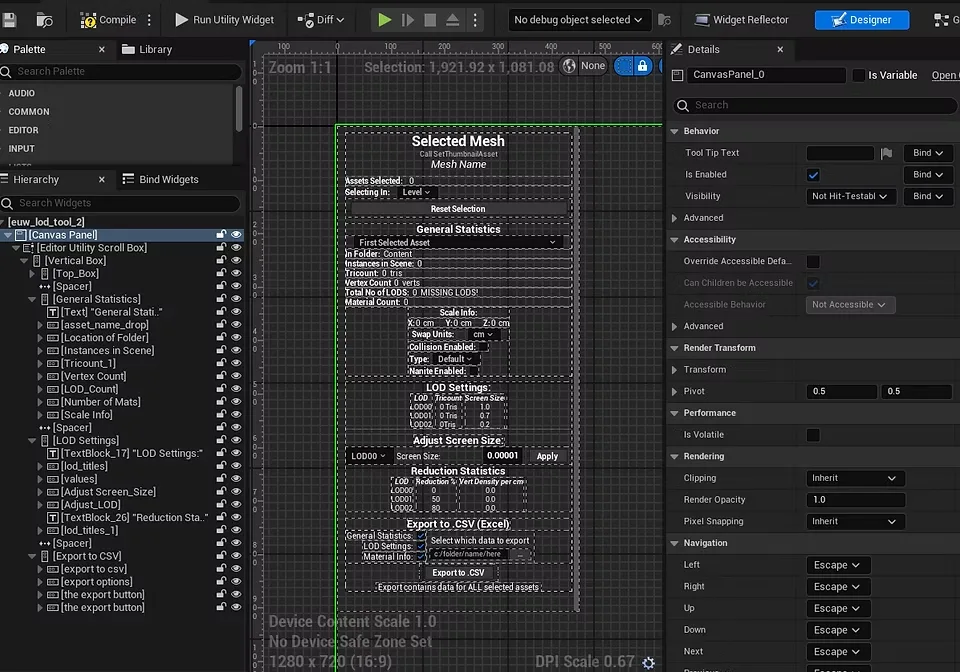
UI Breakdown
I have adjusted the scrollbox for the screenshot however everything composes neatly into a master vertical box filled with category vertical boxes. To ensure that parameters display well spaced there are several horizontal boxes used to layout data. As mentioned before its quite the overload at the moment so I have worked hard to get collapsable menus working.
Collapsable Menus:
As there are a lot of menus I want to collapse I knew I wanted to create a function that could reuse the logic of plugging in a section (vertical box), check if its visible and do the reverse of its state. I’m uncertain if this is a bit of a cheat however when looking on the Python api for components I have not talked to before such as the widget tools I try visualise what I need by drafting the logic using Blueprinting.
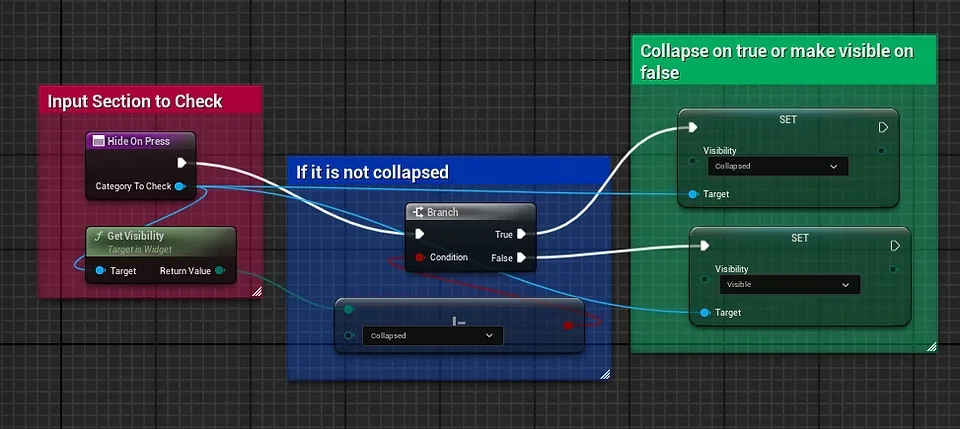
Logic in Blueprint
I then write it out in Python script instead which ends up being a lot more compact than so many several nodes.
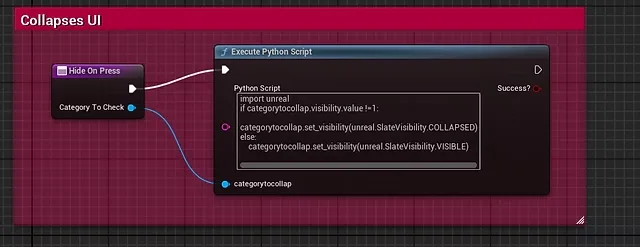
Logic in Python
I then created a input for the input variable (vertical box) to plugin.
Python Script for Collapsable Menus
import unreal

if categorytocollap.visibility.value !=1:

    categorytocollap.set_visibility(unreal.SlateVisibility.COLLAPSED)

else:

    categorytocollap.set_visibility(unreal.SlateVisibility.VISIBLE)
My event graph now is clean ad short, looking like this:
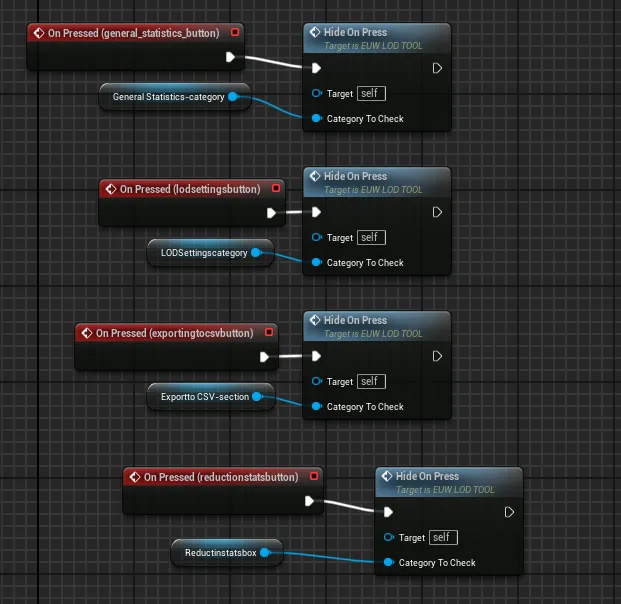
On Pressed to Hide Functiont
And the grand finale, behold it working in engine!
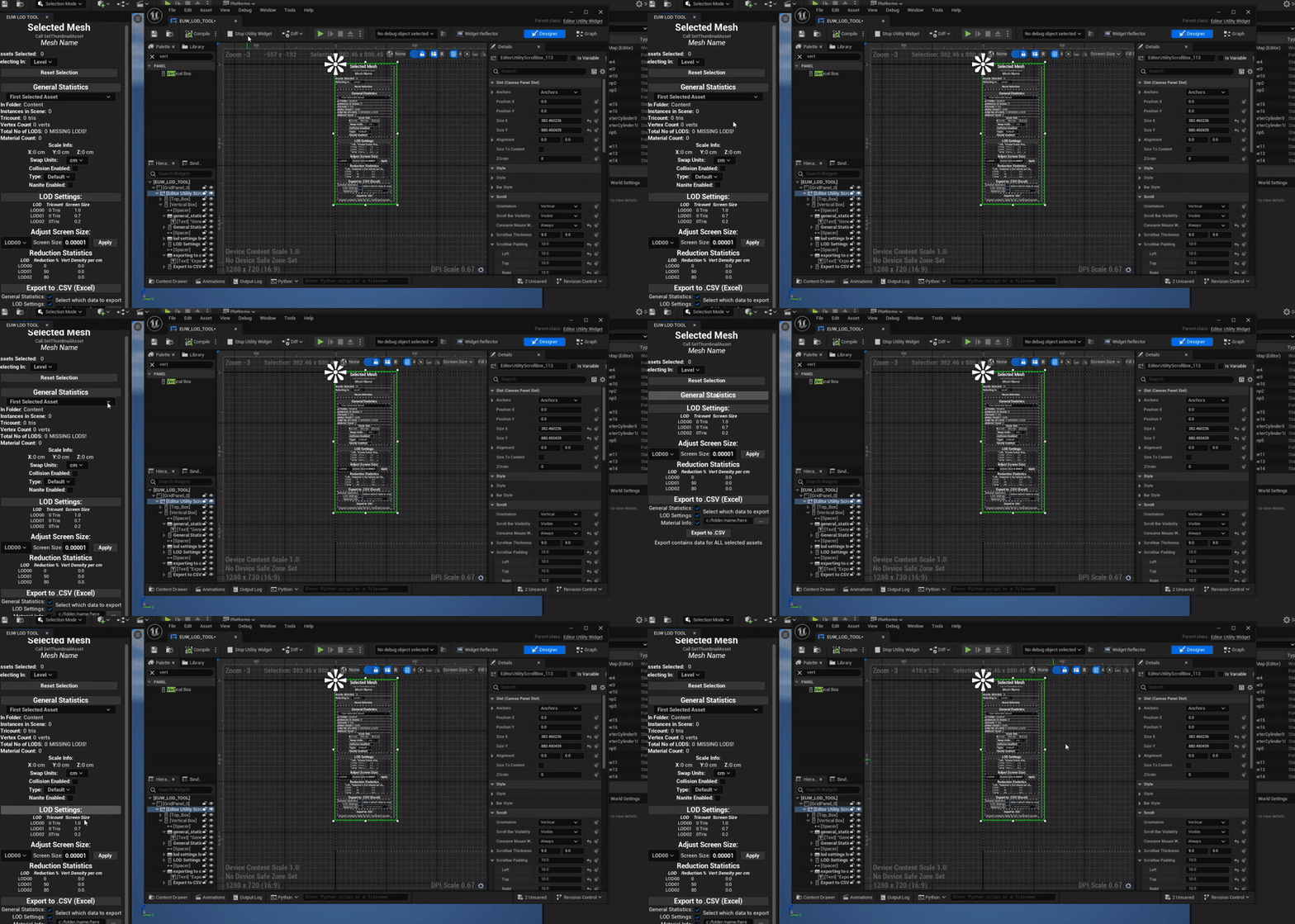
Menu Hide Working in Realtime
Thumbnail and Level Dropdown Execution:
So to start off I knew I needed a way to isolate if the user is selecting in Level or Content Browser as it basically makes or breaks the way select static mesh needs to respond ie cleaning up the selection for only static meshes or prevent selecting non static meshes. I tested out a bit of isolated code to see if I can get a input dropdown index value and use that in if else statements.
Furthermore I wanted visual confirmation that yes I did select the asset it was telling me I selected so this would be done in the way of sending this asset data to the thumbnail. Here is my codes:
Dropdown Selection in Python
if dropdowncheck.get_selected_index()!=0: #content browser
    print("not empty!")
    print("i have selected "+str(amountofitems)+" items in the content browser!")
    asset_data_for_thumb=getselecteditor[0]
    base_data(getselecteditor)
elif dropdowncheck.get_selected_index()!=1: #level
    print("not empty!")
    print("i have selected "+str(amountofitems2)+" items in the level browser!")
    base_data(editor_stat_meshes)
    asset_data_for_thumb=editor_stat_meshes[0]

else: #no selection
    print("empty no selection!")
Getting Thumbnail Content Browser
import unreal
selectionnow=unreal.EditorUtilityLibrary.get_selected_asset_data()
asset_data_for_thumb=asset_data_for_thumb[0]
And heres how it runs in combination with my other script.
So I have a slew of a few issues with gathering thumbnails in level I suspect this may be due to it needing to dig deeper to call the asset data value. However the remainder of the script runs well! And it prints all the info the output log. This is not ideal, I do want it to project it onto the UI so that would be my next step by hooking up a ton of inputs like I did for my hide python function.
Click to view code
import unreal
import datetime

##gets date time for my debug log printing
print(str(datetime.datetime.now()))
artistmode=True ##true is artist mode aka level selection, false is tech art mode for editor only
editor_stat_meshes=[]

getselecteditor=unreal.EditorUtilityLibrary.get_selected_assets_of_class(unreal.StaticMesh)
getselectlevel=unreal.get_editor_subsystem(unreal.EditorActorSubsystem).get_selected_level_actors()

def clean_static_meshes(listofmeshes):
    counter=0
    for x in listofmeshes:
        if isinstance(listofmeshes[counter], unreal.StaticMeshActor):
            print("its a static mesh!")
            editor_stat_meshes.append(listofmeshes[counter])
            counter=counter+1
        else:
            print("nope aint a static mesh")
            counter=counter+1

clean_static_meshes(getselectlevel)

def base_data(listofmeshes):
    ##for first mesh
    ##this fixes not getting static mesh if selection is in editor
    #if artistmode==False:
    #need a rewrite now with more try especially on artist check
    try:
        thecomponent=listofmeshes[0].static_mesh_component
        getstaticmesh=thecomponent.static_mesh

    except AttributeError:
        getstaticmesh=listofmeshes[0]

    nameofmesh=getstaticmesh.get_name()
    print(str(nameofmesh))

    #scale of box
    #also rounds values so they are not scary big decimals
    scaleofmesh=getstaticmesh.get_bounding_box()
    dimensionsx=round(scaleofmesh.max.x-scaleofmesh.min.x,1)
    dimensionsy=round(scaleofmesh.max.y-scaleofmesh.min.y,1)
    dimensionsz=round(scaleofmesh.max.z-scaleofmesh.min.z,1)

    print("this box has a width of "+str(dimensionsx)+" and height of "+str(dimensionsy)+" and a depth of "+str(dimensionsz))

    ##get total amount of lod number and current
    numberoflods=getstaticmesh.get_num_lods()
    print("this mesh has "+str(numberoflods) +" lods")

    ##this runs through each lod and its tricount and vertice count bit annoying
    lodcounter=0
    geteditor=unreal.get_editor_subsystem(unreal.StaticMeshEditorSubsystem)
    while lodcounter!=numberoflods:
        print("lod "+str(lodcounter)+" has "+str(getstaticmesh.get_num_triangles(lodcounter))+" tris")
        vertexcount=geteditor.get_number_verts(getstaticmesh,lodcounter)
        print("yeas")
        print(str(vertexcount))
        #### also get what lod distance is per one

        lodcounter=lodcounter+1

    ##finding out screensize and putting it into people words
    getscreensizes=unreal.EditorStaticMeshLibrary.get_lod_screen_sizes(getstaticmesh)
    nicerscreenlist=[]
    listcounter=0
    while listcounter!= len(getscreensizes):
        percentofscreen=round(getscreensizes[listcounter]*50,2)
        nicerscreenlist.append(percentofscreen)
        print("lod "+str(listcounter)+" pops in at "+str(percentofscreen)+"% screensize!")
        listcounter=listcounter+1
    print(str(nicerscreenlist))

    ###material nos
    numberofmats=geteditor.get_number_materials(getstaticmesh)
    print("this mesh has "+str(numberofmats)+" material(s)!")

    ##more info on materials such as what is each mat
    matlodnumber=[]
    matcounter=0
    while matcounter!=numberofmats:
        materialselected=getstaticmesh.get_material(matcounter)
        if materialselected:
            gettingmat=getstaticmesh.get_material(matcounter).get_name()
            print("this is the mat "+str(gettingmat))

        else:
            print("empty mat!")
        matcounter=matcounter+1

    ##vertex reduction
    vertexredcounter=0
    highestvertex=geteditor.get_number_verts(getstaticmesh,0)
    while vertexredcounter!=numberoflods:
        currentvertexdensity=100-round(geteditor.get_number_verts(getstaticmesh,vertexredcounter)/geteditor.get_number_verts(getstaticmesh,0)*100,2)
        print("this lod is "+str(currentvertexdensity)+"% vertex cheaper than lod0")
        vertexredcounter=vertexredcounter+1

    ##tricount reduction lods
    tricountcounter=0
    while tricountcounter!=numberoflods:
        currenttricountdensity=100-round(getstaticmesh.get_num_triangles(tricountcounter)/getstaticmesh.get_num_triangles(0)*100,2)
        print(str(getstaticmesh.get_num_triangles(tricountcounter)))
        print("this lod is "+str(currenttricountdensity)+"% tricount cheaper than lod0")
        tricountcounter=tricountcounter+1
        print("booyah")

    #vertex density by diving number of vertices by bounding diameter length so x also round cos scary decimal
    #this needs to be fixed for lod bounding areas if i can do that as it only get bound of lod00
    counter=0
    while counter!=numberoflods:
        currentvertex=geteditor.get_number_verts(getstaticmesh,counter)
        lodscaleofmesh=getstaticmesh.get_bounding_box()
        lodlength=round(lodscaleofmesh.max.x-lodscaleofmesh.min.x,1)
        diameterlod=round(currentvertex/lodlength,2)
        print("this lod has a "+str(diameterlod)+" vert density per cm")
        counter=counter+1

    #tag ideas, has vertex colors under staticmesheditorsubsyrtem,

    #get complexity of collision
    collisioncomp=geteditor.get_collision_complexity(getstaticmesh)
    thenumberofflag=collisioncomp.value
    if thenumberofflag==0:
        print("its just use default")
    elif thenumberofflag==1:
        print("its uSE_SIMPLE_AND_COMPLEX")
    elif thenumberofflag==2:
        print("its USE_SIMPLE_AS_COMPLEX")
    elif thenumberofflag==3:
        print("its USE_COMPLEX_AS_SIMPLE")
    #unrealprim=unreal.PrimitiveComponent
    gettingcoll=getstaticmesh.get_editor_property('body_setup')
    check_if_enabled = gettingcoll.get_editor_property('collision_reponse').value
    print(str(gettingcoll.get_editor_property('collision_reponse')))
    if check_if_enabled==0:
        print("collision is enabled")
    else:
        print("collision is off")
    #print(str(checkcheckcollision_enabled))
    #test2=istherecoll.get_collision_enabled()


amountofitems=len(getselecteditor)
amountofitems2=len(editor_stat_meshes)

print(str(amountofitems))
print(str(amountofitems2))


if dropdowncheck.get_selected_index()!=0: #content browser
    print("not empty!")
    print("i have selected "+str(amountofitems)+" items in the content browser!")
    asset_data_for_thumb=getselecteditor[0]
    base_data(getselecteditor)
elif dropdowncheck.get_selected_index()!=1: #level
    print("not empty!")
    print("i have selected "+str(amountofitems2)+" items in the level browser!")
    base_data(editor_stat_meshes)
    asset_data_for_thumb=editor_stat_meshes[0]

else: #no selection
    print("empty no selection!")
Date: 18.04.2025**
Setting UI Values Works!
I jumped out of my seat when this finally worked as the amount of time fiddling with inputs felt like forever to ensure all the values were set correctly. However I’m happy to report all printed data is now set in a clean manner up on the widget itself. Heres a video:
Data Set on UI from Python
Heres how the spaghetti looks under the hood:
So much blue its a ocean of spaghetti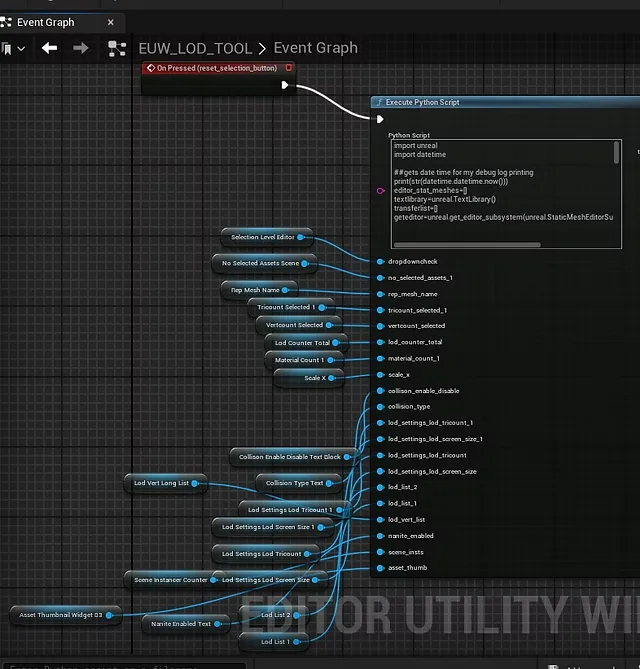
Progress of Code - Its really long now be warnedClick to view code
import unreal
import datetime

##gets date time for my debug log printing
print(str(datetime.datetime.now()))
editor_stat_meshes=[]
textlibrary=unreal.TextLibrary()

getselecteditor=unreal.EditorUtilityLibrary.get_selected_assets_of_class(unreal.StaticMesh)
getselectlevel=unreal.get_editor_subsystem(unreal.EditorActorSubsystem).get_selected_level_actors()

def clean_static_meshes(listofmeshes):
    counter=0
    for x in listofmeshes:
        #is static mesh
        if isinstance(listofmeshes[counter], unreal.StaticMeshActor):
            editor_stat_meshes.append(listofmeshes[counter])
            counter=counter+1
        #not static mesh
        else:
            counter=counter+1

clean_static_meshes(getselectlevel)

def base_data(listofmeshes):
    ##for first mesh
    ##this fixes not getting static mesh if selection is in editor
    #if artistmode==False:
    #need a rewrite now with more try especially on artist check
    try:
        thecomponent=listofmeshes[0].static_mesh_component
        getstaticmesh=thecomponent.static_mesh

    except AttributeError:
        getstaticmesh=listofmeshes[0]

    nameofmesh=getstaticmesh.get_name()
    text_nameofmesh=textlibrary.conv_string_to_text(str(nameofmesh))
    rep_mesh_name.set_text(text_nameofmesh)

    #scale of box
    #also rounds values so they are not scary big decimals
    scaleofmesh=getstaticmesh.get_bounding_box()
    dimensionsx=round(scaleofmesh.max.x-scaleofmesh.min.x,1)
    dimensionsy=round(scaleofmesh.max.y-scaleofmesh.min.y,1)
    dimensionsz=round(scaleofmesh.max.z-scaleofmesh.min.z,1)
    text_dimensionsx=textlibrary.conv_int_to_text(dimensionsx)
    text_dimensionsy=textlibrary.conv_int_to_text(dimensionsy)
    text_dimensionsz=textlibrary.conv_int_to_text(dimensionsz)
    scale_x.set_text(text_dimensionsx)
    scale_y.set_text(text_dimensionsy)
    scale_z.set_text(text_dimensionsz)

    #get thumb by finding asset and nabbing data
    datapath=getstaticmesh.get_path_name()
    data_for_thumb = unreal.EditorAssetLibrary.find_asset_data(datapath)
    asset_thumb.set_asset(data_for_thumb)

    ###get the folder by using path from previous


    ##get total amount of lod number and current
    numberoflods=getstaticmesh.get_num_lods()
    text_numberoflods=textlibrary.conv_string_to_text(str(numberoflods))
    lod_counter_total.set_text(text_numberoflods)

    ##this makes long list of lod numbers to accompany tris and vert counts
    listlodcounter=0
    LODNUMBERLISTER=""
    while listlodcounter!=numberoflods:
        LODNUMBERLISTER+="LOD0"+str(listlodcounter)+"{/n}"
        listlodcounter+=1

    replacelonglodcounter = LODNUMBERLISTER.replace("{/n}", "\n")
    text_LODNUMBERLISTER=textlibrary.conv_string_to_text(replacelonglodcounter)
    lod_list_1.set_text(text_LODNUMBERLISTER)
    lod_list_2.set_text(text_LODNUMBERLISTER)


    ##this runs through each lod and its tricount and vertice count bit annoying
    lodcounter=0
    geteditor=unreal.get_editor_subsystem(unreal.StaticMeshEditorSubsystem)
    text_solotricount=textlibrary.conv_int_to_text(getstaticmesh.get_num_triangles(0))
    text_solovertcount=textlibrary.conv_int_to_text(geteditor.get_number_verts(getstaticmesh,0))
    tricountlister=""
    vertexlister=""
    while lodcounter!=numberoflods:
        tricountlister+=str(getstaticmesh.get_num_triangles(lodcounter))+"{/n}"
        vertexlister+=str(geteditor.get_number_verts(getstaticmesh,lodcounter))+"{/n}"
        lodcounter=lodcounter+1

    replacetricountlister = tricountlister.replace("{/n}", "\n")
    replacevertexlister = vertexlister.replace("{/n}", "\n")
    text_tricountlister=textlibrary.conv_string_to_text(replacetricountlister)
    text_vertexlister=textlibrary.conv_string_to_text(replacevertexlister)
    lod_settings_lod_tricount.set_text(text_tricountlister)
    lod_vert_list.set_text(text_vertexlister)
    tricount_selected_1.set_text(text_solotricount)
    vertcount_selected.set_text(text_solovertcount)

    ##is nanite enabled on this mesh and report back
    get_nanite_settings = getstaticmesh.get_editor_property("nanite_settings")
    checkenablednanite = get_nanite_settings.get_editor_property("enabled")

    if checkenablednanite==True:
        nanite_enabled.set_text(textlibrary.conv_string_to_text("Enabled"))
    else :
        nanite_enabled.set_text(textlibrary.conv_string_to_text("Disabled"))

    ##counting how many instances of this static mesh are in scene
    instcounter=0
    theeditorworld=unreal.EditorLevelLibrary.get_editor_world()
    worldactors=unreal.GameplayStatics.get_all_actors_of_class(theeditorworld, unreal.Actor)

    for actor in worldactors:
            staticchecker = actor.get_components_by_class(unreal.StaticMeshComponent)
            for selected in staticchecker:
                pickedmesh = selected.get_editor_property("static_mesh")
                if pickedmesh == getstaticmesh:
                    instcounter += 1

    scene_insts.set_text(textlibrary.conv_int_to_text(instcounter))

    ##finding out screensize and putting it into people words
    getscreensizes=unreal.EditorStaticMeshLibrary.get_lod_screen_sizes(getstaticmesh)
    nicerscreenlist=""
    listcounter=0
    while listcounter!= len(getscreensizes):
        percentofscreen=round(getscreensizes[listcounter]*50,2)
        nicerscreenlist+=str(percentofscreen)+"{/n}"
        listcounter=listcounter+1

    replacescreensize = nicerscreenlist.replace("{/n}", "\n")
    text_nicerscreenlist=textlibrary.conv_string_to_text(replacescreensize)
    lod_settings_lod_screen_size.set_text(text_nicerscreenlist)


    ###material nos
    numberofmats=geteditor.get_number_materials(getstaticmesh)
    numberofmatsname=str(numberofmats)
    text_numberofmats=textlibrary.conv_string_to_text(numberofmatsname)
    material_count_1.set_text(text_numberofmats)

    ##more info on materials such as what is each mat
    matnamescollective=[]
    matcounter=0
    while matcounter!=numberofmats:
        materialselected=getstaticmesh.get_material(matcounter)
        if materialselected:
            gettingmat=getstaticmesh.get_material(matcounter).get_name()
            matnamescollective.append(str(matnamescollective))
        else:
            print("none mat!")
        matcounter=matcounter+1


    ##vertex reduction
    vertexredcounter=0
    highestvertex=geteditor.get_number_verts(getstaticmesh,0)
    vertexreductionlist=""
    while vertexredcounter!=numberoflods:
        vertexreductionlist+=str(100-round(geteditor.get_number_verts(getstaticmesh,vertexredcounter)/geteditor.get_number_verts(getstaticmesh,0)*100,2))+"{/n}"
        vertexredcounter=vertexredcounter+1

    replacevertextreductionlist = vertexreductionlist.replace("{/n}", "\n")
    text_vertexreductionlist=textlibrary.conv_string_to_text(replacevertextreductionlist)
    lod_settings_lod_screen_size_1.set_text(text_vertexreductionlist)


    ##tricount reduction lods
    tricountcounter=0
    tricountreductionlist=""
    while tricountcounter!=numberoflods:
        currenttricountdensity=100-round(getstaticmesh.get_num_triangles(tricountcounter)/getstaticmesh.get_num_triangles(0)*100,2)
        tricountreductionlist+=str(currenttricountdensity)+"{/n}"
        tricountcounter=tricountcounter+1

    replacetricount = tricountreductionlist.replace("{/n}", "\n")
    text_tricountreductionlist=textlibrary.conv_string_to_text(replacetricount)
    lod_settings_lod_tricount_1.set_text(text_tricountreductionlist)


    #vertex density by diving number of vertices by bounding diameter length so x also round cos scary decimal
    #this needs to be fixed for lod bounding areas if i can do that as it only get bound of lod00
    counter=0
    listofvertexdensity=""
    while counter!=numberoflods:
        currentvertex=geteditor.get_number_verts(getstaticmesh,counter)
        lodscaleofmesh=getstaticmesh.get_bounding_box()
        lodlength=round(lodscaleofmesh.max.x-lodscaleofmesh.min.x,1)
        diameterlod=round(currentvertex/lodlength,2)
        listofvertexdensity+=str(diameterlod)+"{/n}"
        counter=counter+1

    replacingstringline = listofvertexdensity.replace("{/n}", "\n")
    text_listofvertexdensity=textlibrary.conv_string_to_text(replacingstringline)
    lod_settings_lod_screen_size_1.set_text(text_listofvertexdensity)

    #get complexity of collision
    collisioncomp=geteditor.get_collision_complexity(getstaticmesh)
    thenumberofflag=collisioncomp.value
    complexityofcollision="No Complexity"
    if thenumberofflag==0:
        ##complexityofcollision="Default"
        collision_type.set_text(textlibrary.conv_string_to_text("Default"))
    elif thenumberofflag==1:
        #complexityofcollision="Simple and Complex"
        collision_type.set_text(textlibrary.conv_string_to_text("Simple and Complex"))
    elif thenumberofflag==2:
        #complexityofcollision="Simple as Complex"
        collision_type.set_text(textlibrary.conv_string_to_text("Simple as Complex"))
    elif thenumberofflag==3:
        #complexityofcollision="Complex as Simple"
        collision_type.set_text(textlibrary.conv_string_to_text("Complex as Simple"))


    gettingcoll=getstaticmesh.get_editor_property('body_setup')
    check_if_enabled = gettingcoll.get_editor_property('collision_reponse').value
    collisionenabledquestion=False
    if check_if_enabled==0:
        #collisionenabledquestion=True
        collison_enable_disable.set_text(textlibrary.conv_string_to_text("Enabled"))

    else:
        #collisionenabledquestion=False
        collison_enable_disable.set_text(textlibrary.conv_string_to_text("Disabled"))


amountofitems=len(getselecteditor)
amountofitems2=len(editor_stat_meshes)

#print(str(amountofitems))
#print(str(amountofitems2))


if dropdowncheck.get_selected_index()!=0: #content browser
    #print("not empty!")
    #print("i have selected "+str(amountofitems)+" items in the content browser!")
    asset_data_for_thumb=getselecteditor[0]
    no_selected_assets_1.set_text(textlibrary.conv_int_to_text(amountofitems))
    base_data(getselecteditor)
elif dropdowncheck.get_selected_index()!=1: #level
    #print("not empty!")
    #print("i have selected "+str(amountofitems2)+" items in the level browser!")
    no_selected_assets_1.set_text(textlibrary.conv_int_to_text(amountofitems2))
    base_data(editor_stat_meshes)
    asset_data_for_thumb=editor_stat_meshes[0]


else: #no selection
    print("empty no selection!")
Fixing Missing Thumbnail on Start:
One issue I had was the tool had no thumbnail to select at the start of construction. I ended up going with the most foolproof option of selecting a engine cube since that asset always exists. Heres how it looks plus the code:
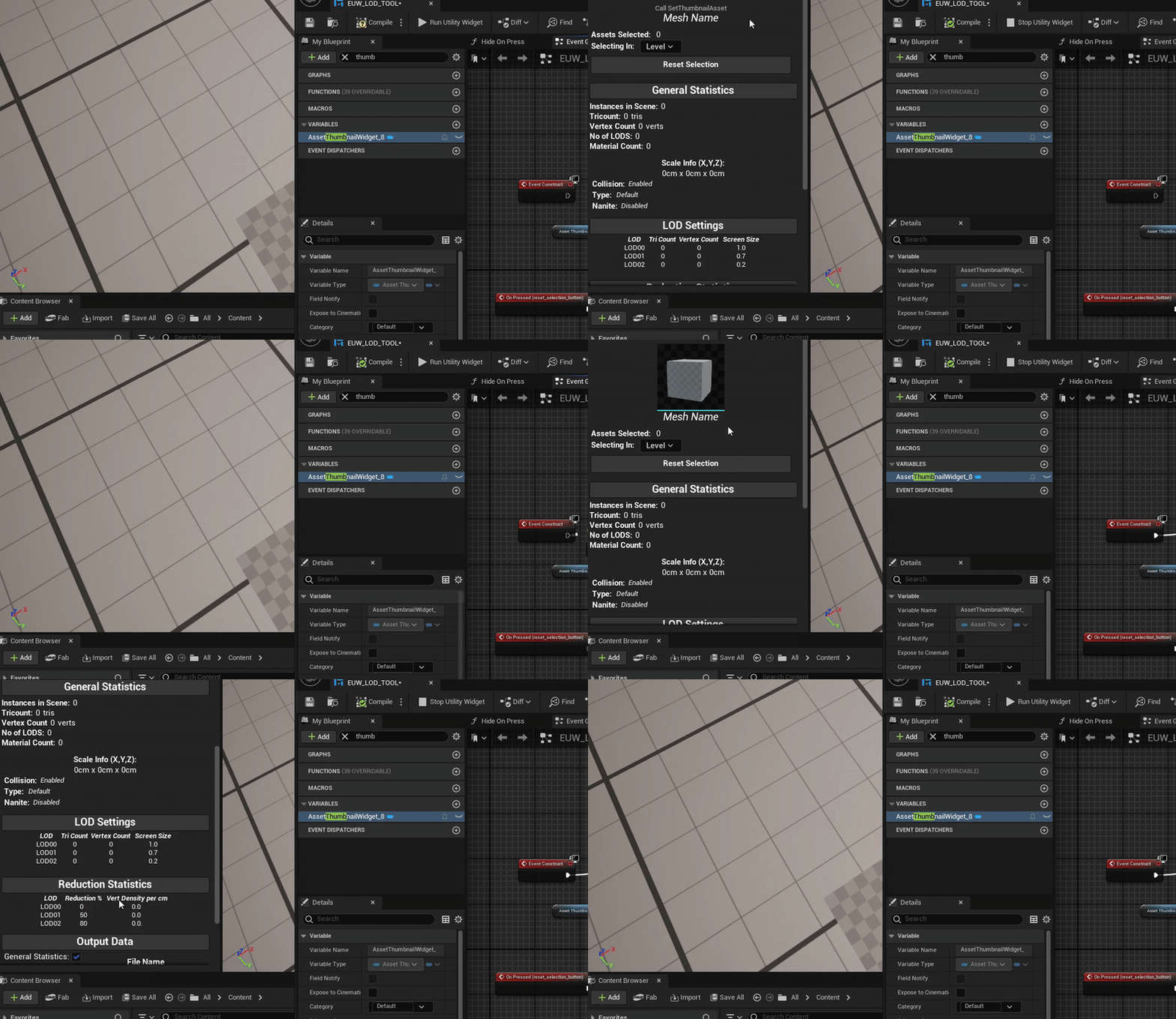
Empty to Default Cube Thumbnail on Construct
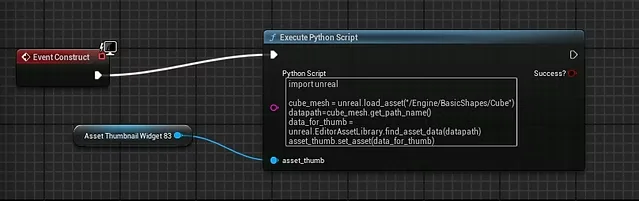
How code is plugged in
import unreal
cube_mesh = unreal.load_asset("/Engine/BasicShapes/Cube")

datapath=cube_mesh.get_path_name()

data_for_thumb = unreal.EditorAssetLibrary.find_asset_data(datapath)

asset_thumb.set_asset(data_for_thumb)
Reflection
I am running quite behind on my tool at the moment, according to my schedule I should be on documentation. However I need to still tackle the following things:
CSV Export from selected data
Folder location input somehow
Lot of missing functionality from buttons like update screen size or selected item dropdown
Some of the default text is weird like verts on tris etc needs updating
Sign Off:
For the essence of time I will be focusing on functionality and the core aspects such as the exporting. I may need to cut some options such as the dropdown index selection or adjustments however they can always be added later, its time to focus on the fundamentals features.
20-23.04.2025
So much work, so little time
I decided to really focus over the past few days to update, fix and get elements functional heres all the work.
Rewrite for Clean Looping
I decided to export the data across to my CSV it should be ammended into a string array. My initial approach was a bit nightmareish, I decided to just copy and paste my code, removing the set data and cleaning it up to focus on a good string export. This ended up predictably, doubling my line count to 475 lines.
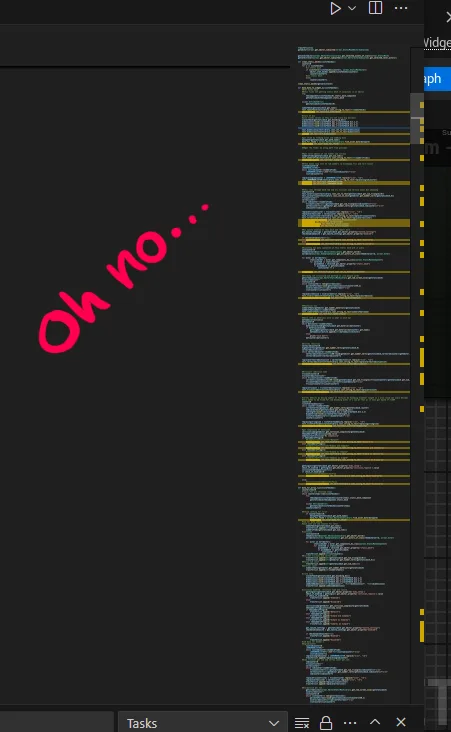
Not good, time to rewrite
So my rewritten and final code looks like this (and is only 275 lines!)
UI Update
I got some feedback from my peers that the UI is quite barebones at the minute and could do with some splashes of color to distinguish core buttons. The menus being hideable were also not clear at all and a lot of data was centred which looked off. So I went to work quickly redesigning it and implementing a refresh.
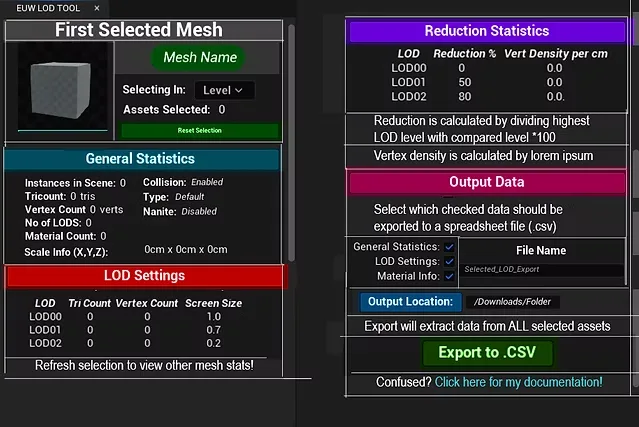
Photoshop Edit
In Engine Preview:
Engine Preview New UI Revamp
I quite like how the borders split up data and after showcasing it back to my peers they have mixed opinions. On one hand some of them like the colors and some of them dislike the amount so I may simplify this to shades in the future. However the borders have been a brillaint success alongside my written tooltips explaining a bit more of how elements are calculated.
Exporting Data from Selected String using Categories
I figured out via counting that my total string array would be 17 entries per row, so using this figure I could divide a total length of a array to figure out how many lines to write.
If the array is for example 34 in length this means there are two rows or two different selected objects to write.
From this I could also isolate not to write a row if not selected in the checklist via the popping command.
Screenshot of me counting and removing unused string headers
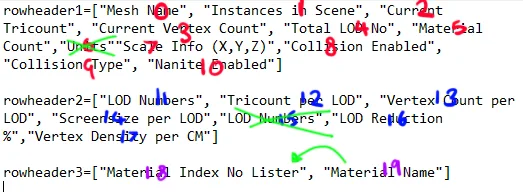
I ended up encountering some problems initially as I made it only count to 16 which ended up cutting off the material count as I mistook the value 0 for not counted.
Here it is finally working!
Exporting all, none or select categories to .CSV
Code below for you to try, hook it up to UI element to check from in inputs alongside a string array to go into it.
Click to view code
import csv
import os
from pathlib import Path


input_data_from_select=["just empty now"]

masterhead=[]
masterrows=[]
rowheader1=["Mesh Name", "Instances in Scene", "Current Tricount", "Current Vertex Count", "Total LOD No", "Material Count","Scale Info (X,Y,Z) in CM","Collision Enabled", "Collision Type", "Nanite Enabled"]
rowheader2=["LOD Numbers", "Tricount per LOD", "Vertex Count per LOD", "Screensize per LOD","LOD Reduction %","Vertex Density per CM"]
rowheader3=["Material Index No and Name"]

##super useful breakdowns of csv https://www.freecodecamp.org/news/how-to-create-a-csv-file-in-python/
##need a file naming and folder location setter before running export
naming_file="default_name"
creating_csv_name=naming_file+".csv"

#checked state value is
if exportcsv_check_1.get_checked_state().value==1:
    masterhead+=rowheader1

if exportcsv_check_2.get_checked_state().value==1:
    masterhead+=rowheader2
if exportcsv_check_3.get_checked_state().value==1:
    masterhead+=rowheader3
else:
    print("unchecked")

section1=exportcsv_check_1.get_checked_state().value
section2=exportcsv_check_2.get_checked_state().value
section3=exportcsv_check_3.get_checked_state().value

amountofitems=len(transferlist)/17
addcounter=0

csvname=str(chosen_file_name.text)+".csv"

#csvname="mycsv"+".csv"
if selectedfolder:
    desiredpath=selectedfolder
else:
    desiredpath=Path.home() / 'Downloads'

filepath=os.path.join(desiredpath,csvname)

with open(filepath, 'w', newline='') as file:
    writer = csv.writer(file, quoting=csv.QUOTE_ALL)
    writer.writerow(masterhead)
    while addcounter!=amountofitems:
        currentadd=[]
        for x in range(17):
            print(str(x))
            if (0 <= x <= 9):
                if exportcsv_check_1.get_checked_state().value==1:
                    currentadd.append(transferlist[0])
                    transferlist.pop(0)
                else:
                    transferlist.pop(0)
            elif (10 <= x <= 15):
                if exportcsv_check_2.get_checked_state().value==1:
                    currentadd.append(transferlist[0])
                    transferlist.pop(0)
                else:
                    transferlist.pop(0)
            elif x==16:
                if exportcsv_check_3.get_checked_state().value==1:
                    currentadd.append(transferlist[0])
                    transferlist.pop(0)
                else:
                    transferlist.pop(0)

        writer.writerow(currentadd)
        addcounter+=1
        print(str(addcounter))
Folder Selection:
I knew I wanted the user to choose the folder to export to so I did some research and found a brilliant library called Tkinter (geeksforgeeks, 2020). From the post I would not need the button as I would be calling it via the on pressed button in Unreal however the remainder of the code would be highly relevant in getting the file path. Heres how it works:
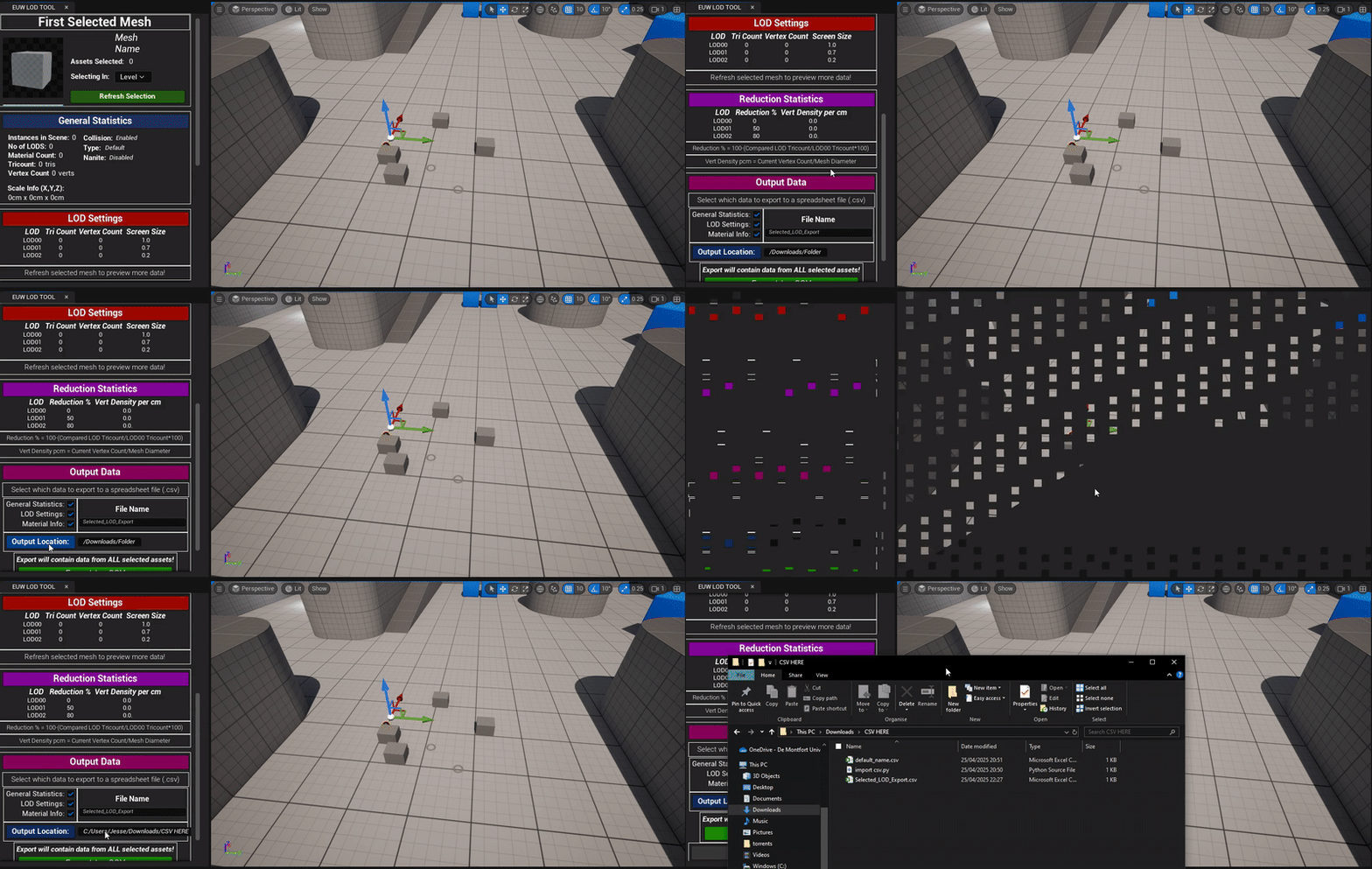
Folder Select Window
Blueprint Overview:
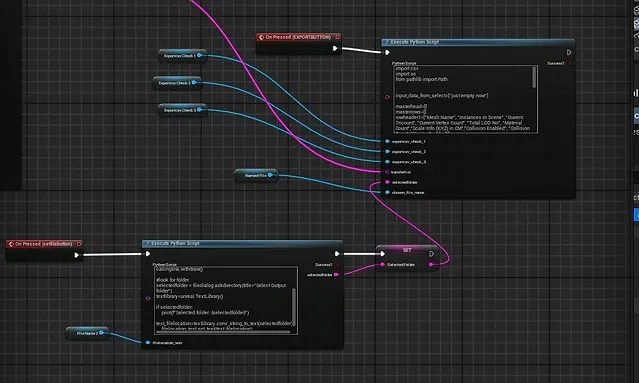
Connection to CSV Export Script via String
import unreal

##a easy to use gui interface https://www.geeksforgeeks.org/python3-gui-application-overview/ tkinter

import tkinter as tk

from tkinter import filedialog

#starting tink

callingtink = tk.Tk()

callingtink.withdraw()


#look for folder

selectedfolder = filedialog.askdirectory(title="Select Output folder")

textlibrary=unreal.TextLibrary()


if selectedfolder:

    print(f"Selected folder: {selectedfolder}")

    text_filelocation=textlibrary.conv_string_to_text(selectedfolder)

    filelocation_text.set_text(text_filelocation)

else:

    filelocation_text.set_text("Missing! Default to Downloads")
Sign Off:
This all for production, I will just need to write up my documentation and my project is finally finished!
Bibliography:
geeksforgeeks (2020). File Explorer in Python using Tkinter. [online] GeeksforGeeks. Available at: https://www.geeksforgeeks.org/file-explorer-in-python-using-tkinter/ [Accessed 23 Apr. 2025].
24.04.2025
Writing Documentation
As I have never written documentation before this came to be quite the challenging task. I knew what I wanted to state however I knew I would need to brainstorm everything that would be important for using the tool for the first time plus problems that might appear. When designing this documentation I used peer feedback to help strengthen the topics covered which came in quite handy.
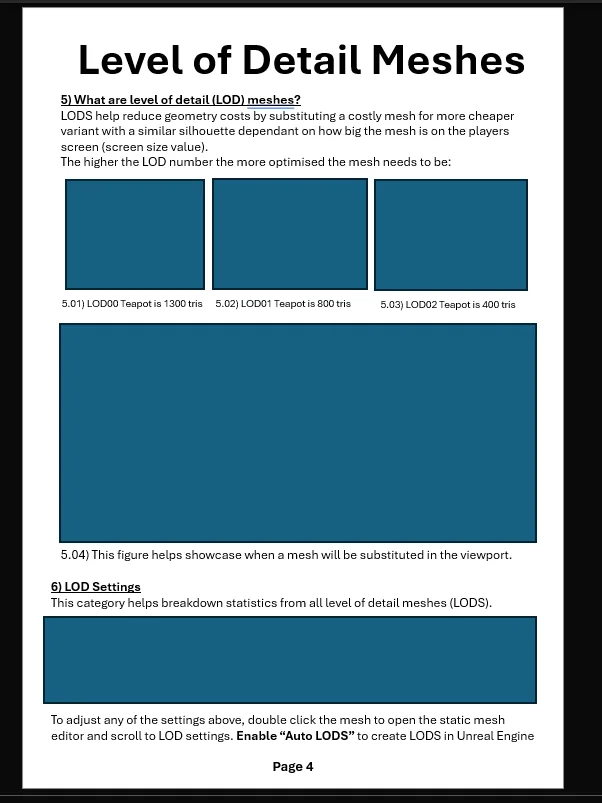
Sample of my LOD page before adding images
I initially wrote everything without pictures to try and put in words as much as possible before adding the pictures as a bonus ontop. I kept functions basic and explanations to the point.
Heres the final result with a fancy cover too! Download it below!
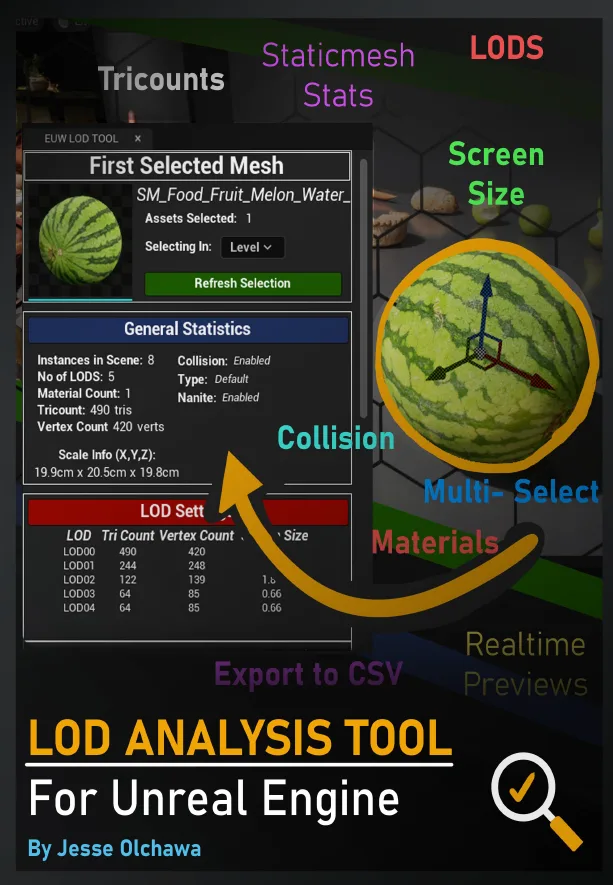
Cover for my documentation
For my cover I used the tool in a sample environment by Quixel Megascans to help get a taste of what it would look like in a full game scene! Its a brilliant and tasty medieveal banquet do check them out below.
25.04.2025
Project Renders
Heres some breakdowns of my blueprint setup and final video showcase of features. As everything is primarily running through scripts my previous days post may be better to preview those elements.
Full Video Function Showcase:
Breakdown Shots:
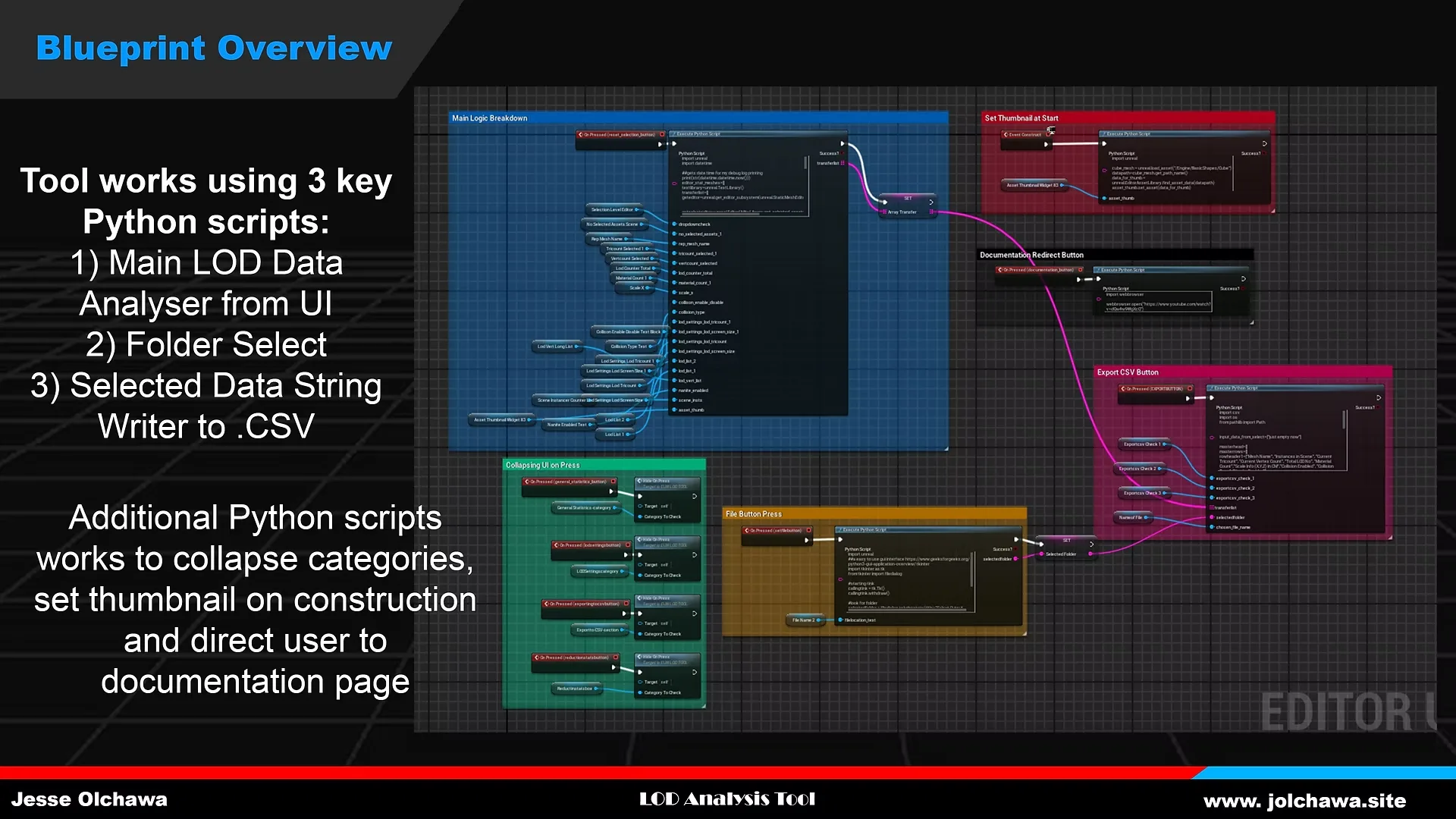
Blueprint Overview
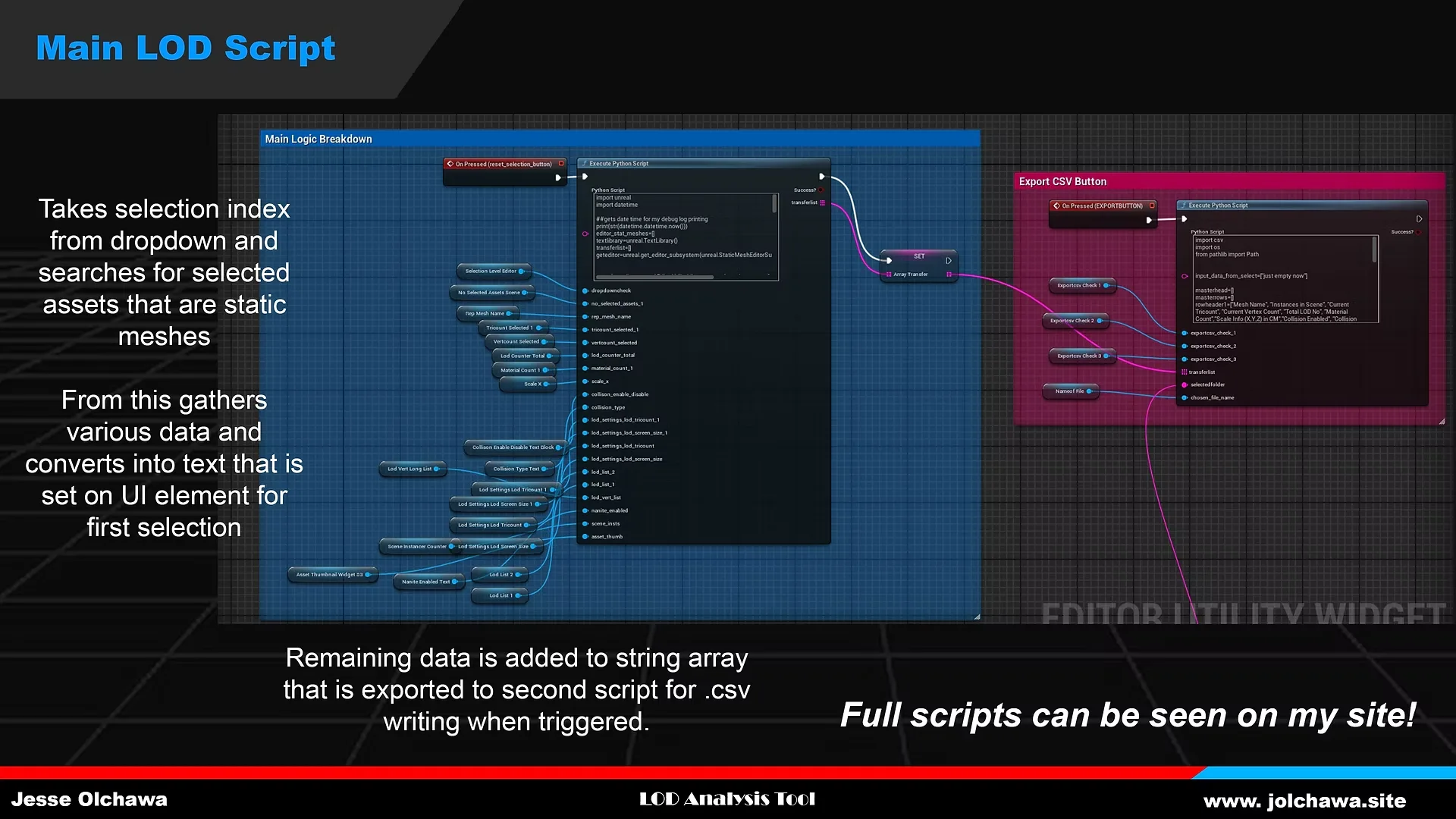
Main LOD Script
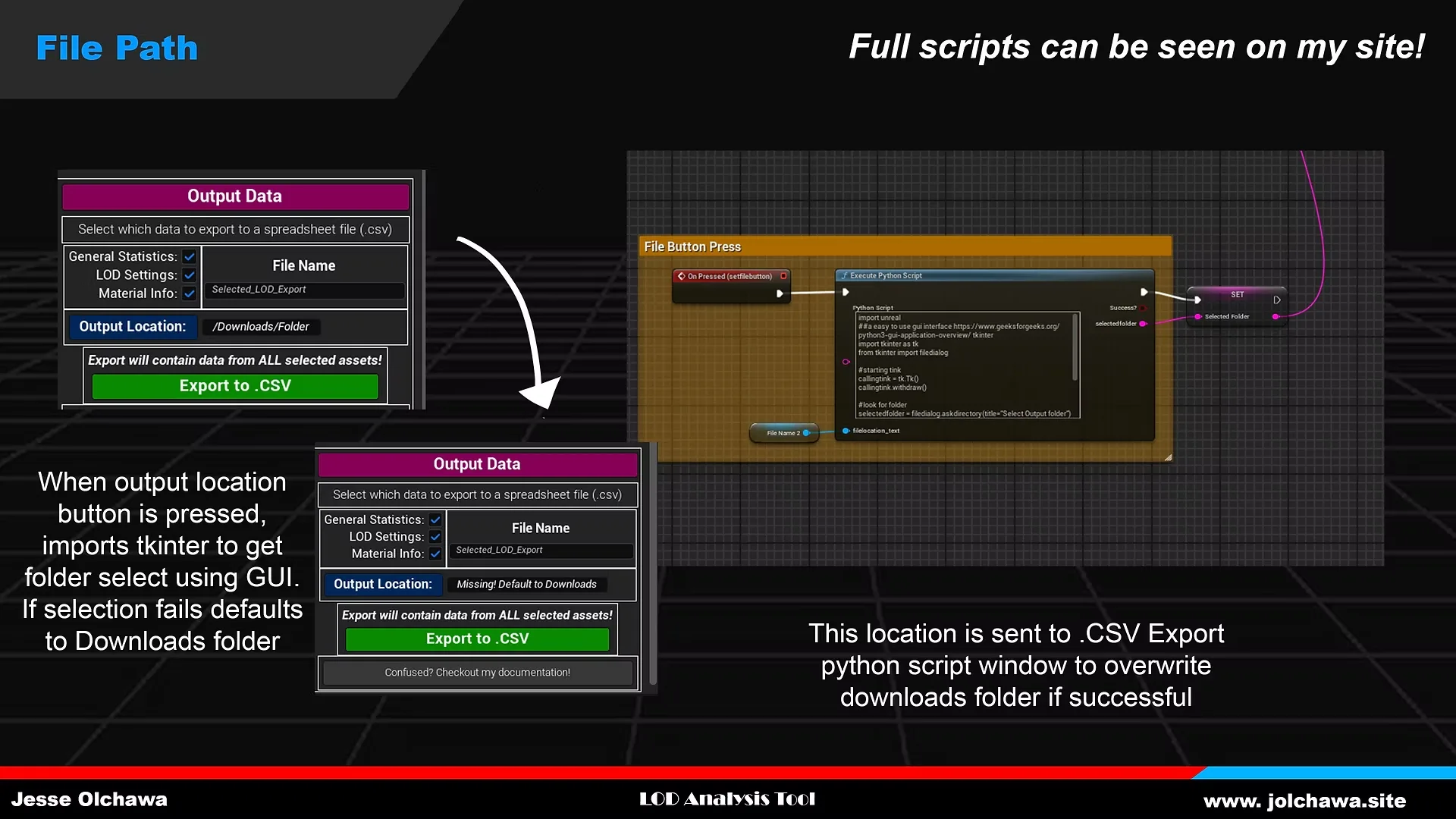
Folder Selecting
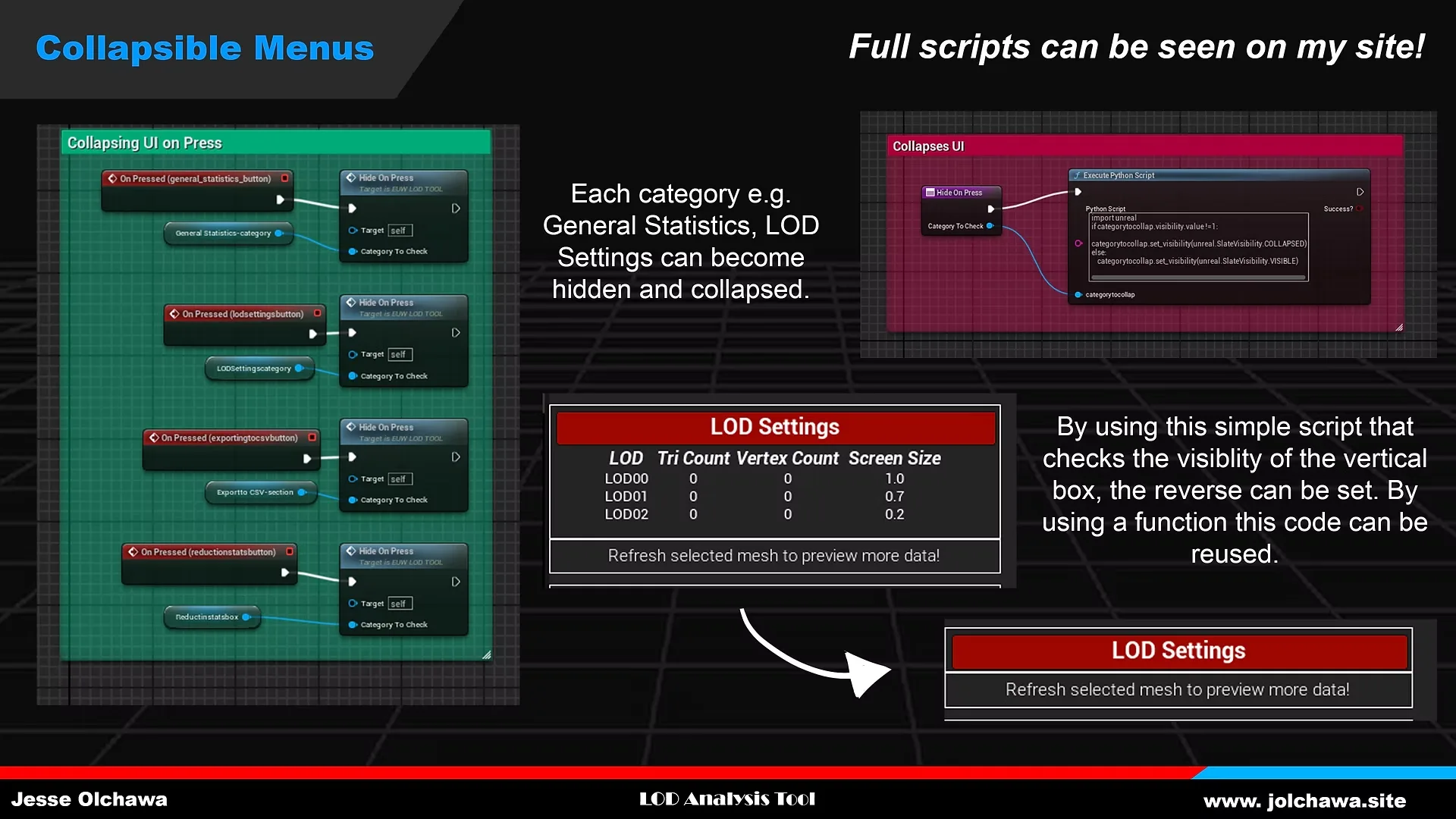
Collapsible Menus
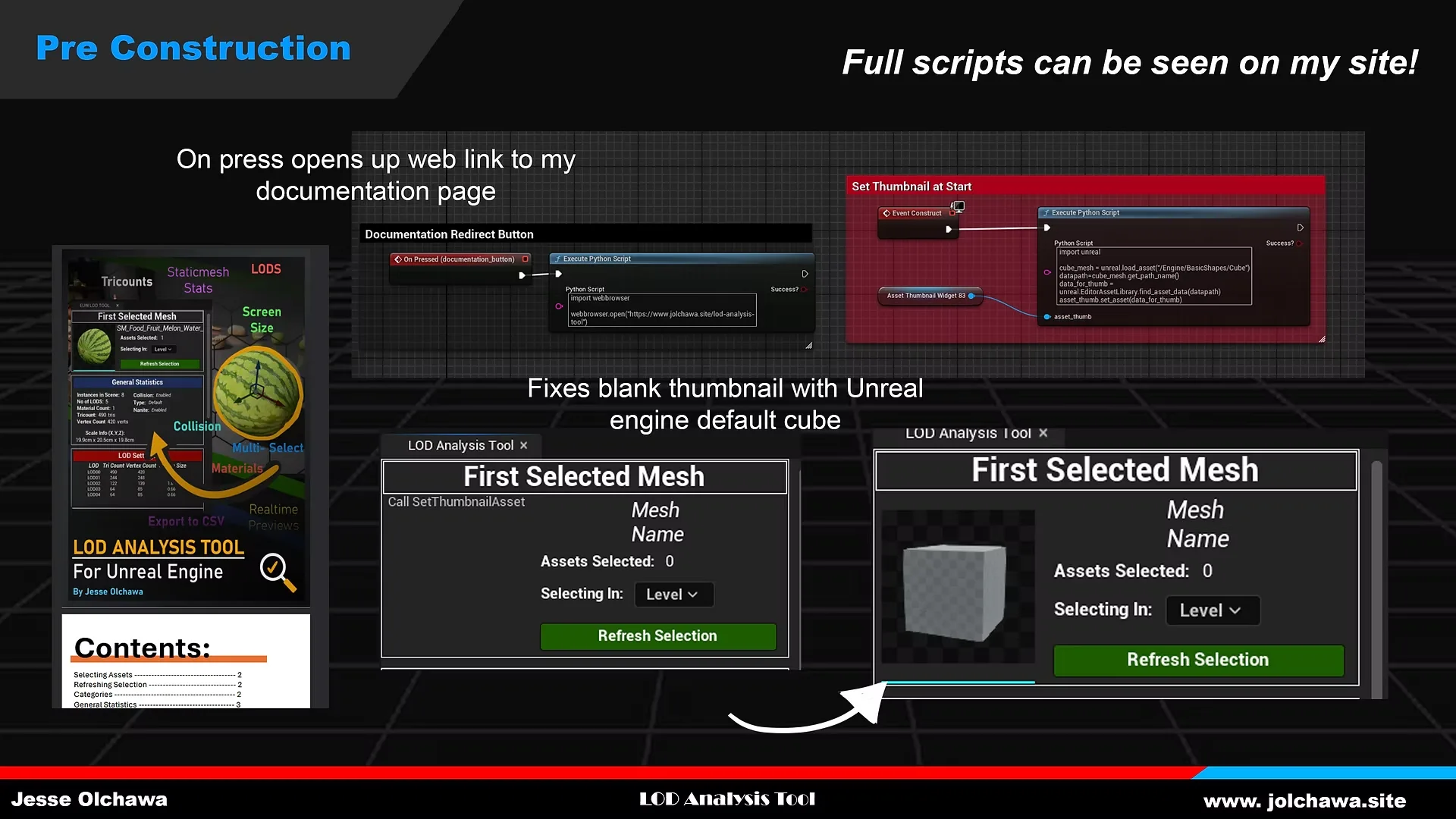
Pre Constructon and Link Script
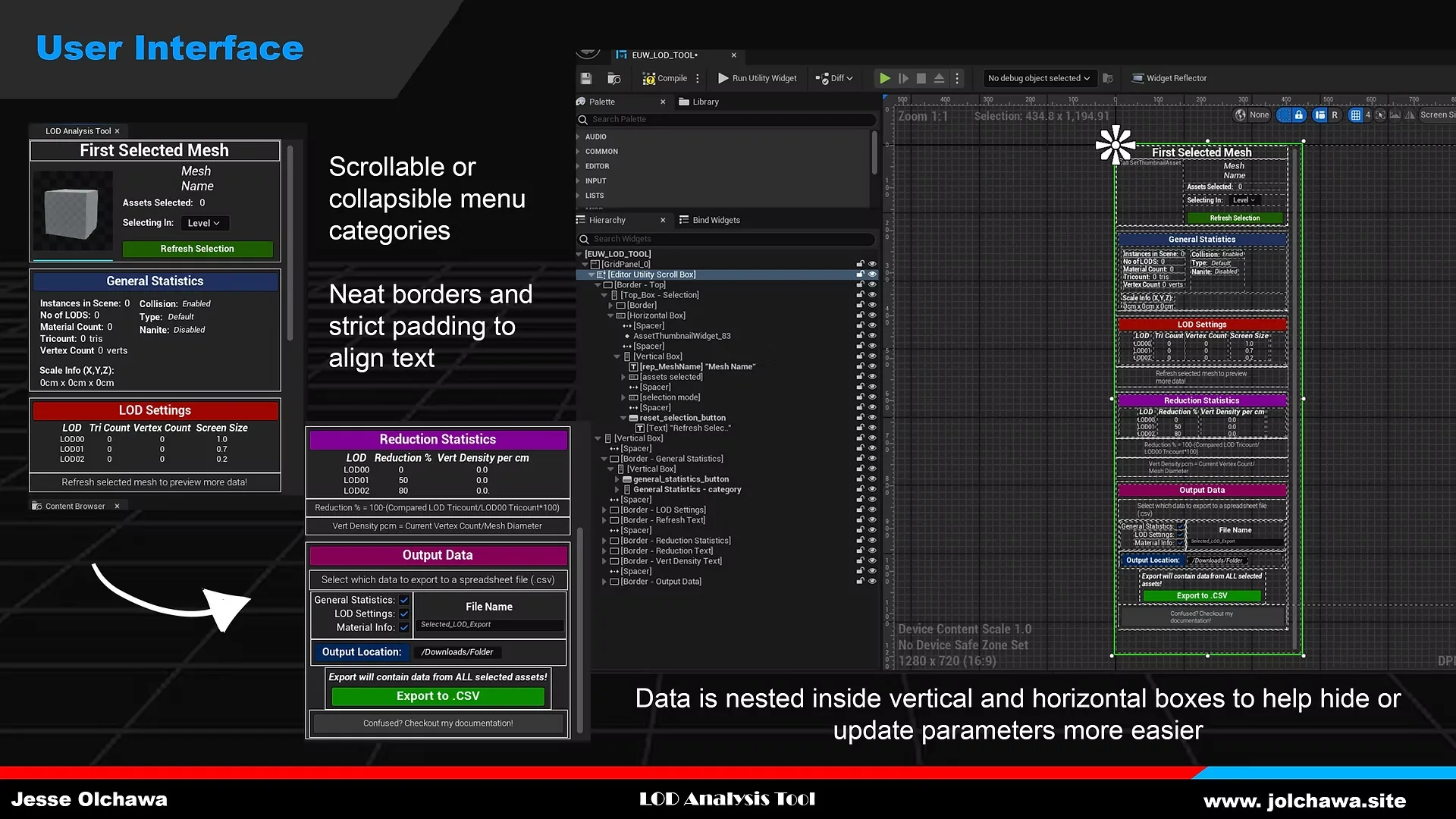
User Interface
Project Post Mortem:
What Went Well:
Overall I’m quite happy with the tools output and result. Whilst there may be a few bugs with collision remaining the usability is still consistent and simple to pick up. I’ve had positive feedback overall and I have learnt quite a lot about python I have not known before. I also feel they this tool is a brilliant template for other widgets I can create that need to utilise UI elements such as a material swapper or mass renamer. I have also been able to implement functions, loops and cut down my code to be quite optimised over the course of my development.
What Went Wrong:
As it’s my first major python tool I have had numerous issues with elements running, looping, bad syntaxes and missing parameter values near the beginning. However, I have been able to learn from my mistakes and become a lot faster at debugging. On the other hand, the tool could be improved by having actionable buttons to remedy quick fixes for commonly found problems.
Final reflection:
In conclusion I would consider this a semi successful project in meeting the outlines but leaves enough wiggle room for future upgrades. It was also my first time writing proper documentation which I want to do more of as it was both super fun and super helpful when passing for peer feedback. For my future projects I want to make a few more of these tools in Python and UE.
© Jesse Olchawa 2025-
This site is powered with Hugo using the Console Theme.